Article Summary: How-to pages are focused instructional resources that guide users through a specific task or problem using clear, step-by-step information. For small businesses, they can attract long-tail search traffic, build trust, demonstrate industry expertise, support local SEO, and connect readers to relevant products or services. Effective how-to pages include a descriptive title, organized steps, useful visuals, internal links, strong mobile performance, and content that directly matches what customers are searching for. They can also reduce repetitive customer questions by serving as a 24/7 self-service resource.
Deep Dive with AI
What Is a How-To Page on a Website
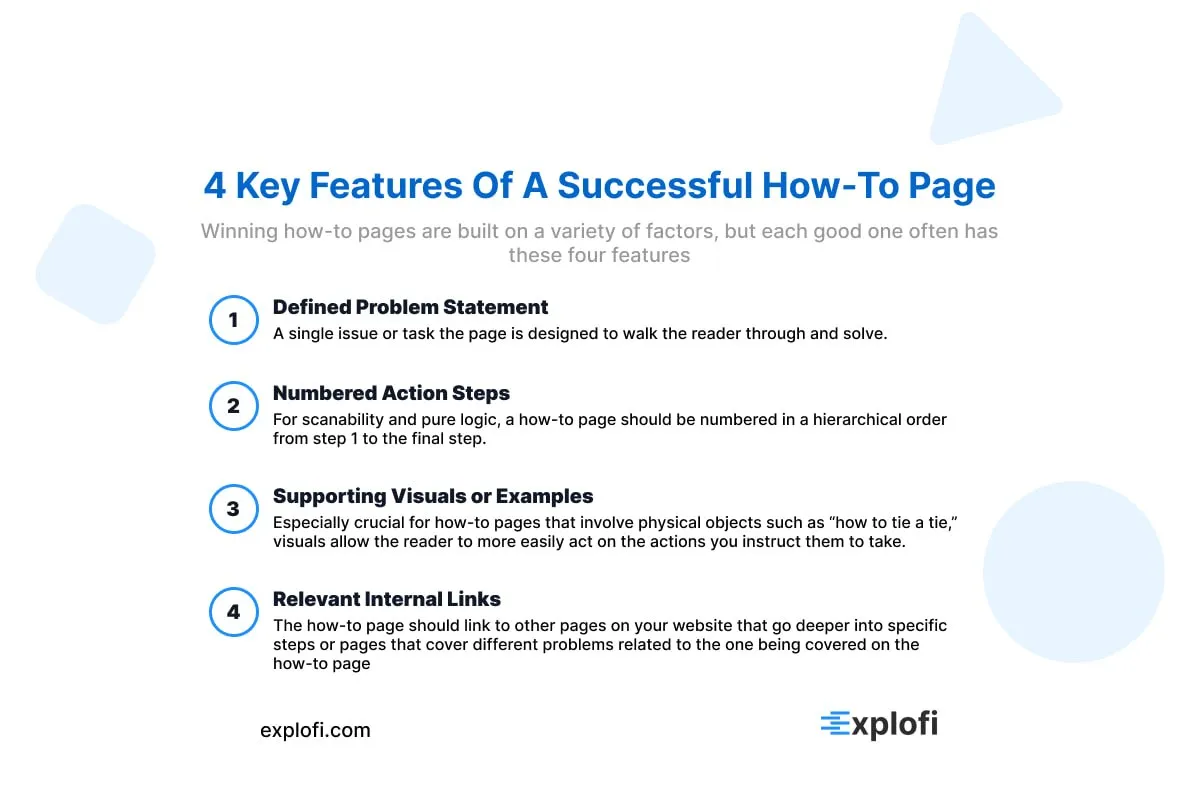
A how-to page on a website is a dedicated instructional page that walks potential customers through a specific process, task, or concept related to a business's products or services. Unlike blog posts, which often cover broad topics, how-to pages are laser-focused on solving one problem with clear, step-by-step guidance.
These pages typically include:
- A defined problem statement
- Numbered action steps
- Supporting visuals or examples
- Relevant internal links
From my experience building SaaS tools, how-to pages function as evergreen content assets, meaning they continuously drive website traffic long after publication. Search engines like Google prioritize pages that directly answer user queries, and how-to pages are structured precisely to do that, helping small businesses rank higher in search results organically.
Why How-To Pages Are a Powerful Tool for Small Businesses
How-to pages give small businesses a precise way to capture search traffic from people actively looking for solutions. According to HubSpot, websites with educational content generate 126% more leads than those without it. Rather than broadly targeting keywords, a how-to page targets specific search intent, which directly improves search rankings for long-tail queries.
For small businesses, this matters because:
- Long-tail keywords convert at 36% higher rates than generic terms
- Educational pages earn 3x more backlinks on average
- How to content keeps site visitors engaged longer, reducing bounce rates
This kind of targeted online presence builds genuine authority with potential customers, since solving a real problem positions your business as a trusted resource before any sale is made.
How-To Pages Help Establish Your Business as an Industry Authority
Consistent how-to content signals expertise to search engines and potential clients alike. According to the Nielsen Norman Group, users form trust with a website within the first 10 seconds, and educational content accelerates that process significantly. When a small business regularly publishes detailed how-to pages, search engines index that pattern as topical authority, improving domain credibility over time.
This directly strengthens search engine optimization by associating your brand identity with reliable, solution-focused knowledge in your industry.
How-To Pages Drive Organic Traffic Through Search Engines
How-to pages consistently rank for long-tail queries because they match the way people naturally search. Google's algorithm prioritizes content that directly answers questions, and structured how-to pages align perfectly with that standard. For local search visibility, these pages targeting specific service queries pull in qualified traffic with clear purchase intent.
How-To Pages Build Trust With Potential Customers Before They Buy
Detailed how-to content signals competence, and competence drives purchasing decisions. When potential customers repeatedly find accurate, helpful answers from a business, trust compounds naturally. Embedding customer testimonials or success stories within these pages reinforces that others have already benefited, making skeptical visitors significantly more confident before committing to a purchase.
How How-To Pages Differ From Other Website Content
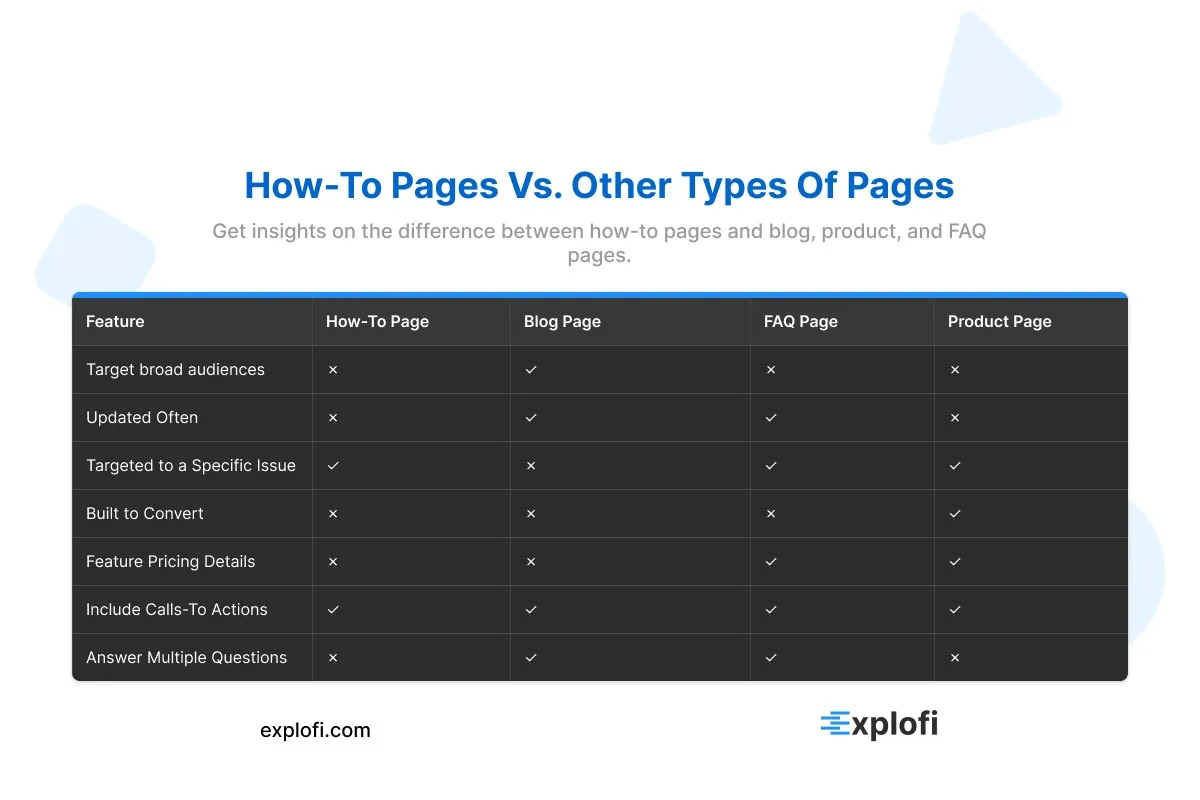
Unlike blog posts or service pages, how-to pages serve one focused purpose: solving a specific problem. They differ in three key ways:
- Step-by-step structure
- Actiondriven intent
- Query specific targeting
This format helps small business websites build credibility with people actively seeking solutions.
How-To Pages vs. Blog Posts
Blog posts are built for ongoing content streams, updated frequently and written to engage broad audiences over time. How-to pages, by contrast, are static, structured resources targeting one specific query. That permanence helps them rank longer, as evergreen pages retain search visibility 2x longer than time-sensitive blog content.
How-To Pages vs. Product or Service Pages
Product or service pages are built to convert, featuring pricing, features, and calls to action. How-to pages, by contrast, educate first, pulling in potential clients before any purchase intent forms. This distinction matters because:
- Service pages close deals
- How-to pages open conversations
How-To Pages vs. FAQ Pages
FAQ pages list multiple questions with brief answers, while how-to pages dive deep into one specific process. According to HubSpot, long-form instructional content drives 55% more website visitors than short-form answers. That focused depth is what helps people find solutions and signals genuine expertise to Google's ranking algorithm.
The Core Elements Every Effective How-To Page Should Include
A how-to page that actually performs well in search and converts readers into customers needs a few non-negotiable structural components. A clear, problem-specific title directly targeting what your potential clients are searching for is the foundation, since pages with specific, question-based titles capture significantly more long-tail traffic.
Following that, the content itself must be broken into numbered, logical steps rather than open paragraphs, as Google's structured data guidelines reward step-based formatting with rich result features in search. Embedding customer reviews or video testimonials within the page reinforces credibility at the exact moment a reader is evaluating whether to trust your solution, which directly lifts conversion rates.
A Clear and Descriptive Page Title With Target Keywords
The page title is where search visibility either starts or collapses. Titles structured around specific, intent-driven phrases like "how to file a sales tax exemption for small businesses" consistently outperform vague alternatives. Keyword research tools show that question-based titles targeting long-tail phrases drive significantly higher click-through rates from search results.
A strong title should:
- Mirror the exact language potential clients use when searching
- Include the specific problem being solved
- Stay under 60 characters to avoid truncation in search results
Step-by-Step Instructions That Are Easy to Follow
Each step should contain one action only, keeping instructions scannable and direct. For example:
- Gather required materials
- Complete the form
Short, action-led steps like these reduce user confusion, helping potential clients follow through without abandoning the process midway.
Visual Aids Such as Images, Videos, or Diagrams
Annotated screenshots, step-by-step diagrams, and short video walkthroughs reduce user confusion by making abstract steps concrete. Stock images rarely serve this purpose well. Instead, use:
- Original screenshots
- Labeled diagrams
- Under 60 second video clips
People process visuals 60,000 times faster than text, directly improving how potential clients follow each step.
Internal Links to Related Products, Services, or Pages
Internal links pointing to related services or product pages within a how-to guide can increase page value by distributing link equity across your site. Linking contextually, such as connecting a "how to file a claim" guide to your services page, gives people a natural next step while signaling topical relevance to Google's crawlers through:
- Anchor text relevance
- Crawl depth reduction
- PageRank flow
How How-To Pages Support Your Overall Content Marketing Strategy
How-to pages strengthen your marketing efforts by feeding content across multiple channels simultaneously. A single well-structured guide can fuel:
- Email campaigns
- Social media posts
- Lead generation funnels
According to HubSpot, companies publishing 16+ blog posts monthly generate 3.5x more traffic than those posting fewer than four. How-to pages, specifically, attract people searching with buying intent, making them high-converting assets that support broader business goals beyond just organic search.
How Small Businesses Can Use How-To Pages to Compete With Larger Brands
Small businesses often struggle to compete with enterprise-level brands that dominate search results through massive content budgets. However, a well-structured how-to page on a small business website levels the playing field by targeting narrow, high-intent queries that larger brands frequently overlook.
According to Spiralytics, long-tail keywords, which how-to pages are built around, convert at 2.5x higher rates than generic terms. Rather than competing for broad keywords, small based businesses can win by targeting queries like "how to unclog a commercial drain in a restaurant kitchen," capturing people actively searching for that exact solution, pulling in potential clients with far less competition and far more precision.
Targeting Niche Topics That Large Competitors Overlook
Large brands target high-volume keywords, leaving long-tail, niche queries wide open for small businesses to capture. Searches containing four or more words convert at nearly 2.5x the rate of generic terms, according to WordStream. A local plumber, for example, could build how-to content around "how to fix a slow-draining kitchen sink without chemicals," a query too narrow for national competitors to prioritize, yet perfectly aligned with what potential clients are actively searching.
Using Local Expertise to Create Hyper-Relevant How-To Content
Local expertise is one area where small businesses genuinely outperform larger brands in how-to content. A neighborhood plumber, for instance, can write a guide on winterizing pipes that references region-specific freeze thresholds, local building codes, or water pressure standards unique to their service area.
This hyper-relevant approach targets:
- Specific local search queries
- Location based buyer intent
- Neighborhood level problem solving
A professional website built around this localized content captures potential clients that broad, generic brand guides simply cannot reach.
The Role of How-To Pages in Search Engine Optimization
How-to pages signal topical authority to Google by targeting long-tail keywords, which account for 70% of all search queries. For a small business website, these pages capture high-intent traffic from people searching for specific solutions, directly improving local search rankings through structured, problem-focused content Google consistently rewards.
How How-To Content Ranks for Long-Tail Keywords
Long-tail keywords, typically three to five words in length, account for 70% of all search queries, and how-to content naturally aligns with this pattern. People searching for specific answers phrase queries like "how to register a small business website" rather than just "website." This phrasing mirrors the structure of how-to titles, giving these pages a ranking edge.
The match between:
- User search intent
- Question based page titles
- Step-by-step content structure
signals strong topical relevance to Google.
Structured Data and Schema Markup for How-To Pages
Schema markup for how-to pages uses `HowTo` structured data, which tells Google exactly how to display your steps as rich results. Pages using this markup see up to a 30% higher click-through rate. The markup includes properties like:
- `step`
- `name`
- `text`
- `image`
This directly improves local search visibility for small business websites.
How Page Speed and Mobile Optimization Affect How-To Page Performance
Page speed directly impacts how-to page rankings, with Google confirming that pages loading within 2.5 seconds perform significantly better in search results. A one-second delay in load time reduces conversions by 7%, making speed a measurable performance factor. For how-to pages specifically, slow load times increase bounce rates before users reach step-by-step content.
Pairing speed with mobile responsive design matters equally, given that 63% of Google searches now happen on mobile devices. A non-responsive layout causes content to render poorly, pushing pages down in mobile search rankings through Google's mobile-first indexing system.
How-To Pages as a 24/7 Customer Service Resource
How-to pages function as a self-service support system, answering the questions existing customers and potential clients repeatedly ask, without requiring your team to respond manually each time. According to MagicSuite, 67% of customers prefer self-service over speaking to a company representative.
For a SaaS founder like myself, a single how-to guide covering a recurring question about payment processing or account setup eliminates dozens of redundant support tickets weekly. Unlike a contact form or live chat, how-to pages deliver consistent, accurate answers around the clock, including:
- Step-by-step troubleshooting
- Feature walkthroughs
- Onboarding instructions
Reducing Repetitive Customer Inquiries With Self-Service Content
Self-service content cuts repetitive support tickets by up to 40%, freeing teams from fielding the same questions repeatedly. How-to pages covering common processes like:
- Account setup
- Payment troubleshooting
- Service cancellations
give potential clients instant answers, reducing inbound inquiry volume significantly.
Empowering Customers to Get More Value From Your Products or Services
How-to pages give customers the guidance needed to unlock features or workflows they would otherwise overlook. For an E-commerce store, a how-to page walking customers through setting up automated reorders or applying discount codes can directly increase purchase frequency. Businesses that provide this level of detail see measurable gains, as educated customers use more of what they buy, reducing churn while increasing the perceived value of your services.
Frequently Asked Questions
What Is a How-To Page and How Does It Differ From Other Types of Content?
A how-to page is a structured piece of content that walks readers through completing a specific task using step-by-step instructions. Unlike blog posts or landing pages, it focuses purely on practical guidance. According to content marketing research, instructional content generates up to 3x more engagement than promotional material, making it a distinctly functional format designed to educate rather than sell.
Why Do Small Businesses Need a How-To Page on Their Website?
A how-to page helps small businesses build credibility and reduce customer confusion. According to research, 96% of customers look for self-service options before contacting support. By offering clear guidance, small businesses can improve user experience, lower support costs, and increase conversions, making a how-to page a practical and essential addition to any business website.
How Can a How-To Page Help Small Businesses Improve Their SEO Rankings?
How-to pages signal expertise to search engines, which can improve rankings. Google's algorithm favors content that demonstrates experience, expertise, authoritativeness, and trustworthiness, known as E-E-A-T. Research shows that long-form, instructional content tends to earn more backlinks, boosting domain authority. For small businesses, how-to pages targeting specific search queries can increase organic visibility and attract customers actively searching for solutions.
What Are the Key Elements of an Effective How-To Page for Small Businesses?
An effective how-to page includes clear, step-by-step instructions, relevant keywords for SEO, and structured formatting that search engines can easily index. Pages using structured data markup can earn rich results in Google Search, increasing visibility. Including visuals, concise language, and a logical flow helps users complete tasks successfully, improving engagement metrics that influence overall search rankings.