
Deep Dive with AI
What Are Internal Links?
Internal links connect one page of a website to another page within the same domain. Unlike external links, which point to outside sources, internal links serve to guide visitors through a site's own content, supporting both user navigation and how search engines crawl and index pages across the entire site.
How Internal Links Differ From External Links
Internal links connect pages within the same domain, while external links point to entirely separate websites. A navigational link in your main menu directing users to your "About" page is internal, whereas a citation pointing to a published study on another site is external. Both serve different purposes in site structure, but internal links carry unique weight because they distribute link equity across your own pages.
Search engine crawlers use these connections to map your entire website, making a strong internal linking structure essential for maintaining healthy search engine rankings.
Internal Linking vs. Link Building
Internal linking and link building are fundamentally different SEO strategies that serve distinct purposes. Internal links pointing to pages within your own site help search engines understand your content's structure and hierarchy, while link building focuses on acquiring external links from other websites to boost domain authority.
A strong internal linking strategy helps distribute page authority across your site, whereas external link acquisition signals credibility to search engines. Notably, internal linking improves crawl efficiency by guiding bots through your site's architecture, making relevant content more discoverable without requiring outreach campaigns or third-party cooperation.
Types of Internal Links
Navigational links appear in menus and footers, guiding users through a site's core pages, like a privacy policy or homepage. Contextual links, embedded within blog posts, use descriptive anchor text to connect related content, which helps search engines understand topical relationships. Sidebar links offer supplementary connections to supporting content.
Each type serves a distinct role in shaping site structure and improving overall user experience.
Navigational Links
Navigational links appear in menus, headers, footers, and sidebars, giving users a reliable path through a website's site structure. Unlike contextual links embedded in body copy, these links serve a structural purpose by connecting broad sections to deeper pages. Their consistent placement across every page ensures:
- Clear pathways to main categories
- Reduced friction between high traffic and supporting pages
- Stronger user experience through predictable navigation
Contextual Links
Contextual links appear naturally within body copy, linking relevant phrases to related pages using descriptive anchor text. Unlike navigation links, they carry semantic weight because they signal topical relationships between pages, strengthening topical authority. Studies show contextual links pass more PageRank value than footer or sidebar links, as search engines weigh placement heavily when determining relevance signals across your content cluster.
Breadcrumb Links
Breadcrumb links map a user's path through a site, such as Home > Blog > SEO > Internal Linking, reinforcing site structure with every page visit. Google's documentation confirms breadcrumbs help guide Google through page hierarchy, directly supporting SEO performance by clarifying how content relates to broader site categories.
Footer Links
Footer links appear in the sitewide footer, making them visible across every page. While they support site structure and user experience, Google treats them as lower-value signals than contextual body links. Overloading footers with keyword-rich anchor text can actually trigger spam signals, so limiting footer links to essential navigation, like privacy policies or contact pages, is good practice.
Sidebar Links
Sidebar links appear in a fixed column alongside the main content, making them persistently visible as users scroll through a page. This placement naturally supports link distribution across a site, since every page sharing the same sidebar passes equity to the same set of destinations. A well-structured sidebar can feature topic cluster hubs, popular posts, or category archives, giving both users and crawlers a clearer view of how content is organized without disrupting the reading flow.
Call-to-Action Links
Call-to-action links are designed to invite readers to take a specific action, like signing up, purchasing, or exploring a related page. Good internal linking encourages users to move deeper into a site rather than leaving after one page, directly reducing bounce rates. These links typically use directive anchor text such as:
- "Get started"
- "See pricing"
- "Explore our services"
- "Read the guide"
Studies show pages with clear CTAs see up to 202% higher conversion rates than those without.
Sitemap Links
Sitemap links are a structured way to map out your entire site's architecture, giving both users and crawlers a clear structure to follow across all pages. An XML sitemap, for instance, tells Google which pages exist and how they're prioritized, with support for up to 50,000 URLs per file according to Google's official guidelines.
This directly supports your site structure by ensuring no page gets orphaned, which is critical for helping search engines understand your full content scope.
Why Internal Linking Is Important for SEO
Internal linking strengthens topical authority by signaling to Google which pages carry the most weight on your site. When you add internal links with descriptive anchor text, you're essentially telling Google how your content relates to a specific topic, helping search engines map your site structure more accurately.
Studies show that strategic internal linking can improve crawl efficiency, meaning Google indexes your content faster. Beyond crawl behavior, internal links distribute PageRank across individual posts, boosting the visibility of lower-performing pages. Thoughtful anchor text also improves user experience by setting clear expectations before a link leads visitors to another page.
Helping Search Engines Discover and Index Your Pages
Search engine crawlers like Googlebot discover new pages by following links, making internal links pointing throughout your site essential for full indexation. Without a clear site structure supported by internal links, pages buried deep within a website risk becoming orphaned, meaning crawlers may never find them.
Google's own documentation confirms that crawling begins from a set of known URLs, then expands through discovered links, so every unlinked page is essentially invisible to search engines.
Establishing a Clear Site Structure and Hierarchy
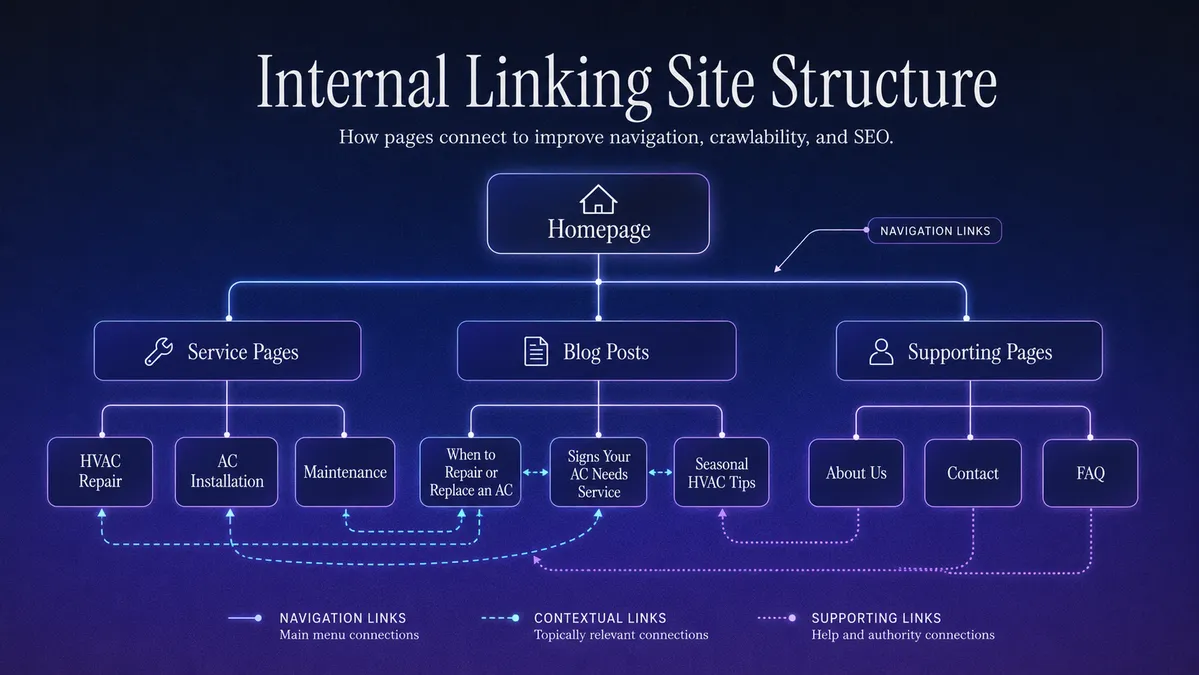
A well-organized site structure signals to search engines how pages relate to each other. Through the content hub model, pillar pages link to supporting topic cluster pages, creating a clear hierarchy. Google's crawlers follow these connections to assess content relationships, with cornerstone content typically earning the most internal links pointing toward it to reinforce topical authority.
Distributing Link Equity Across Your Site
Link equity flows through internal links pointing to your pages, shaping how search engines allocate ranking power across your site. Pages with strong authority pass a portion of that equity through each link. To distribute it strategically:
- Link high authority pages to underperforming content
- Use descriptive anchor text for every link
- Prioritize your main product or service pages
Strengthening Topical Authority
Clustering related pages around a topic cluster model signals subject-matter depth to search engines. When internal links pointing between a pillar page and its supporting content form tight thematic groups, Google interprets the site as authoritative on that subject, directly influencing rankings across all clustered pages.
Improving Crawl Efficiency
Googlebot crawls sites by following links, meaning poorly connected pages can go unindexed. When *adding internal links* throughout your content, you give crawlers clear pathways to reach deeper pages that a navigation menu alone won't surface. Google has confirmed that pages with no internal links pointing to them are significantly harder to discover.
A tighter link structure reduces crawl budget waste, ensuring Googlebot spends its allocated time on pages that actually matter.
Enhancing User Experience and Engagement
Internal links pointing users to relevant content keep visitors engaged longer, directly reducing bounce rates. When a page strategically guides readers to related content, time spent on a website increases significantly, with studies showing users visit 5x more pages on sites with strong internal linking structures.
Thoughtful anchor text further strengthens this by setting clear expectations before a click, improving user experience by ensuring visitors land exactly where they expect, making navigation feel intuitive rather than disorienting.
How Internal Links Work Within Your Site Architecture
Internal links distribute page authority across your site by connecting pages through a hierarchical structure, where pillar pages link to supporting content within a topic cluster. The anchor text used signals relevance to crawlers, directly influencing how Google indexes and ranks connected pages.
Frequently Asked Questions
How Many Internal Links Should a Page Have?
There is no strict rule on how many internal links a page should have. However, keeping links reasonable and relevant is key. Too many links can dilute link equity and confuse crawlers. A common recommendation is to aim for 3 to 5 internal links per 1,000 words, ensuring each link serves a clear navigational or contextual purpose for readers.
Does Internal Linking Directly Boost SEO Rankings?
Internal linking doesn't directly boost rankings, but it plays a significant supporting role. According to Google, internal links help crawlers discover and understand page relationships, distributing PageRank throughout your site. While not a direct ranking factor, studies show proper internal linking improves crawlability, indexation, and topical authority, which indirectly influences search performance and organic visibility.
What Is the Difference Between Internal Links and Backlinks?
Internal links connect pages within the same website, helping users navigate and distributing link equity across your site. Backlinks, also called inbound links, come from external websites pointing to your content. Both influence SEO, but backlinks are generally considered stronger ranking signals, as they act as third-party endorsements of your content's credibility and authority.
How Often Should You Audit Your Internal Links?
Auditing internal links every 3 to 6 months is generally recommended for most websites. Larger sites with frequent content updates may benefit from monthly audits. Regular checks help identify broken links, orphaned pages, and missed linking opportunities, all of which can negatively impact crawlability and rankings over time.
Can Too Many Internal Links Hurt Your SEO?
Too many internal links can dilute link equity, making it harder for search engines to determine which pages are most important. While there is no strict limit, Google's John Mueller has suggested keeping links reasonable and relevant. Excessive or irrelevant internal links may be seen as spammy, potentially harming rankings rather than improving crawlability and page authority distribution.
What Makes a Good Anchor Text for an Internal Link?
Good anchor text is descriptive, concise, and relevant to the linked page's content. According to Google's documentation, anchor text helps both users and search engines understand what the destination page is about. Avoid generic phrases like "click here" in favor of keyword-rich, natural language that accurately reflects the linked content, improving crawlability and user experience.