
Deep Dive with AI
What Is On-Page SEO?
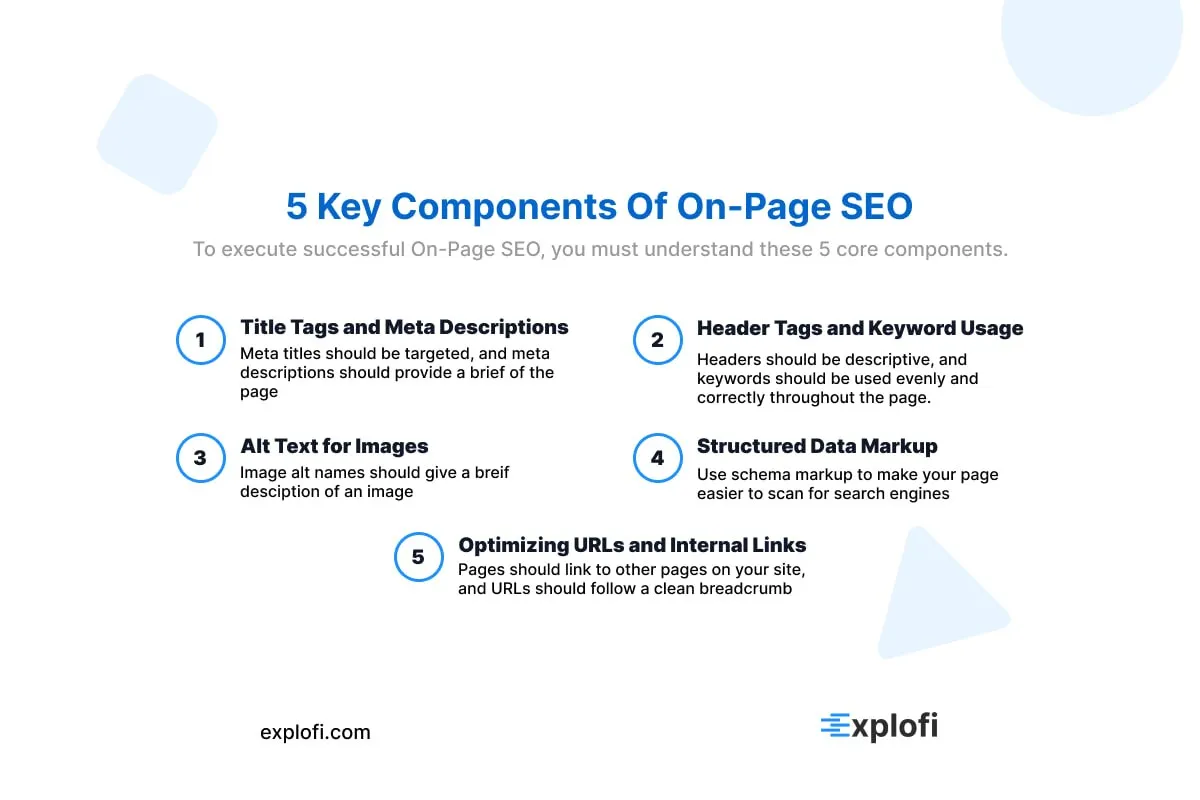
On-page SEO refers to optimizing elements directly on your webpage to improve search engine rankings and attract relevant traffic. Unlike off-page tactics, it gives you full control over ranking factors. Key components include:
- Title tags and meta descriptions
- Header tags and keyword usage
- Alt text for images
- Structured data markup
- Optimizing URLs and internal links
Each element signals relevance to search engines, helping your content rank higher for specific queries.
If you are confused on what SEO even is, read here.
The Core Goals of On-Page SEO
On-page SEO primarily targets three measurable outcomes: boosting search visibility, attracting targeted traffic, and improving user experience. These goals work together because ranking higher means little without retaining visitors. Quality content optimized around a target keyword signals relevance to search engines, while structured data helps secure featured snippets, which Google reports appear in roughly 12.3% of search queries according to ahrefs. If you want to learn more about structured data and how schema markups increase search visibility, read here.
On-Page SEO vs. Off-Page SEO
Off-page SEO, by contrast, focuses on building your site's authority through external signals like backlinks, social media presence, and influencer marketing. While on-page SEO shapes how search engines read and rank your content, off-page SEO shapes how the broader web perceives your site's credibility.
Research from Backlinko found that the number of referring domains correlates more strongly with rankings than almost any other factor, highlighting how critical link building remains. Guest posting on quality sources, for example, can earn backlinks that directly boost organic traffic, whereas on-page work like optimizing title tags and structured data improves how your content is interpreted at the page level.
How On-Page SEO Differs From Technical SEO
Technical SEO operates at the infrastructure level, focusing on how well search engines can crawl, index, and render a site. While on-page SEO targets content relevance through elements like structured data and optimized copy, technical SEO addresses site speed, crawlability, and server-side configurations.
For example, improving Largest Contentful Paint scores through compressing images directly impacts Core Web Vitals, not content quality. A site audit typically reveals these distinctions clearly, separating indexing errors from content gaps. Think of it this way:
- On page SEO tells search engines what a page means
- Technical SEO tells search engines how to access it
Why Both On-Page and Off-Page SEO Work Together
Together, on-page and off-page SEO form a complete SEO strategy that neither discipline can achieve alone. A page with flawless structured data and optimized meta descriptions still struggles to rank without authoritative backlinks pointing to it. Conversely, a site earning hundreds of backlinks loses significant ranking potential if its content fails to match search query intent.
Studies consistently show that top-ranking pages combine both:
- Strong technical on page signals
- High quality referring domain profiles
- Optimized user experience indicators
Online visibility depends on these systems reinforcing each other simultaneously.
Key Elements of On-Page SEO
Structured data, for instance, displays star ratings and product prices directly in search results, increasing click-through rates. Pairing this with friendly URLs that avoid unnecessary parameters keeps pages crawlable and clean. Alt text bridges the gap between visual content and search engine interpretation, ensuring every image contributes meaningfully to your target keyword relevance.
Title Tags
Title tags are one of the most direct ranking signals in search engine optimization, with studies showing that pages with keyword-optimized titles rank significantly better than those without. Keeping tags between 50 and 60 characters prevents Google from truncating them in results. A well-structured title should:
- Place the target keyword toward the front
- Reflect the page's specific content
- Avoid keyword stuffing, which Google penalizes
This precision directly influences click-through rates and organic traffic.
Meta Descriptions
Meta descriptions don't directly influence rankings, but they significantly impact click-through rates, which affects organic traffic. A good meta description stays between 150 and 160 characters and naturally includes the target keyword. Effective ones typically:
- Address a specific user need
- Use active language
- Match search intent precisely
Google rewrites meta descriptions roughly 62.78% of the time when they fail to reflect page content.
Heading Structure (H1-H6)
Proper heading hierarchy gives search engines a clear map of your content's structure. H1 tags should appear once per page and always contain the target keyword, while H2s break content into major sections. Subheadings like H3 through H6 organize supporting details beneath them. Google uses this hierarchy to understand topic relationships within a page, and pages with clear heading structures consistently show stronger organic traffic performance.
A well-built heading structure should:
- Place the target keyword in the H1
- Use H2s for primary subtopics
- Reserve H3-H6 for nested details
URL Structure
URL slugs should be short, descriptive, and keyword-rich, as Google has confirmed that URLs serve as a minor ranking signal. Keeping slugs under 60 characters improves both readability and crawlability, while placing the target keyword early in the URL path strengthens topical relevance. For example, a URL like `/on-page-seo-guide` outperforms `/page?id=1234` because it builds trust with users and search engines alike.
Internal Linking
Optimizing internal links distributes page authority across your site while guiding users toward high-value content. A well-structured internal linking strategy can improve crawl efficiency, helping Google index pages that might otherwise go unnoticed. When building these links, focus on:
- Using descriptive anchor text that reflects the target keyword of the destination page
- Linking from high authority pages to those needing ranking support
- Keeping link depth shallow so important pages sit within three clicks from the homepage
This directly strengthens organic traffic by keeping users engaged longer.
Keyword Optimization
Targeting the right keywords means balancing search volume against ranking difficulty, where long-tail keywords typically convert 2.5 times better than broad terms. Placing your target keyword within the first 100 words of a page signals topical relevance to crawlers. Keyword density should stay near 1-2%, as exceeding that threshold risks triggering Google's over-optimization filters. Topical maps can help an search engine optimizer understand what keywords to target.
Content Quality and Relevance
Thin, duplicate, or keyword-stuffed pages consistently lose rankings because Google's Helpful Content system targets content written for search engines rather than users. Pages ranking in the top three positions typically contain over 1,400 words, covering topics with enough depth to satisfy search intent.
Beyond length, organic traffic responds strongest to content that directly answers what the target keyword implies, whether that's a question, comparison, or step-by-step process.
Image Optimization
Unoptimized images are one of the most overlooked causes of slow page speeds, which directly affects rankings. Search engines read alt text to understand image content, making descriptive, keyword-rich alt attributes essential. Beyond that, file size matters significantly, as images over 100KB can noticeably drag down load times.
Tools like PageSpeed Insights flag these issues precisely. For best results, follow these practices:
- Use WebP format instead of JPEG or PNG
- Compress images below 100KB without sacrificing quality
- Write descriptive alt text containing your target keyword
Mobile-Friendliness and Page Experience
Google's Core Web Vitals directly measure page experience through three metrics: Largest Contentful Paint (LCP), Interaction to Next Paint (INP), and Cumulative Layout Shift (CLS). Sites failing these thresholds see measurable ranking drops, as Google confirmed page experience as a ranking signal in 2021.
A mobile-friendly design is equally critical, given that 63% of organic traffic now originates from mobile devices.
- LCP should load within 2.5 seconds
- INP must stay below 200 milliseconds
- CLS scores should remain under 0.1
Why On-Page SEO Is Important for Website Performance
On-page SEO directly shapes how search engines interpret and rank your content, making it one of the most controllable factors in your overall SEO strategy. Search engines like Google analyze individual page elements, from title tags to structured data, to determine relevance and authority. Studies show that organic traffic driven by strong on-page signals converts at 14.6%, compared to just 1.7% for outbound methods, reflecting how precisely optimized pages attract users already aligned with your content's intent.
How to Conduct Keyword Research for On-Page SEO
Keyword research begins with identifying terms your target audience actually searches for, and Google Search Console is a reliable tool for uncovering real query data tied to your existing pages. From there, prioritize keywords based on search volume, competition, and intent alignment. A target keyword with clear informational or transactional intent signals which direction your content should take.
Long-tail keywords, those with three or more words, capture 70% of all search queries, making specificity far more valuable than broad targeting. Explofi uses this same logic when generating content for small businesses, pulling competitor data and local search signals to identify the specific long-tail queries your customers are actually using so you are never guessing which keywords to target. If you want to understand local search or local seo and how businesses need to optimize for it, read here.
Identifying Target Keywords and Search Intent
Matching your content to what users actually want from a search is the foundation of effective keyword research. Search intent breaks into four categories: informational (users want to learn), navigational (users seek a specific site), commercial (users are comparing options), and transactional (users are ready to buy).
Tools like Google Search Console reveal which queries already drive impressions, making it a good starting point for identifying target keyword opportunities with real demand behind them.
Using Long-Tail Keywords to Capture Niche Traffic
Long-tail keywords, typically three to five words, convert at 36% higher rates than broad terms because they match specific search intent. Targeting phrases like "on-page SEO optimization techniques for small blogs" attracts users ready to engage. Key advantages include:
- Lower keyword competition
- Higher purchase or action intent
- Stronger content to query alignment
Targeting Featured Snippets Through Strategic Keyword Use
Featured snippets appear in approximately 12.3% of search queries, making them high-value targets through strategic keyword use. Structuring content around question-based phrases like "what is" or "how to" triggers snippet eligibility, since Google pulls these directly from well-organized answers. Using structured data markup further signals content relevance, improving AI overview visibility across modern search platforms.
How to Write SEO-Optimized Title Tags
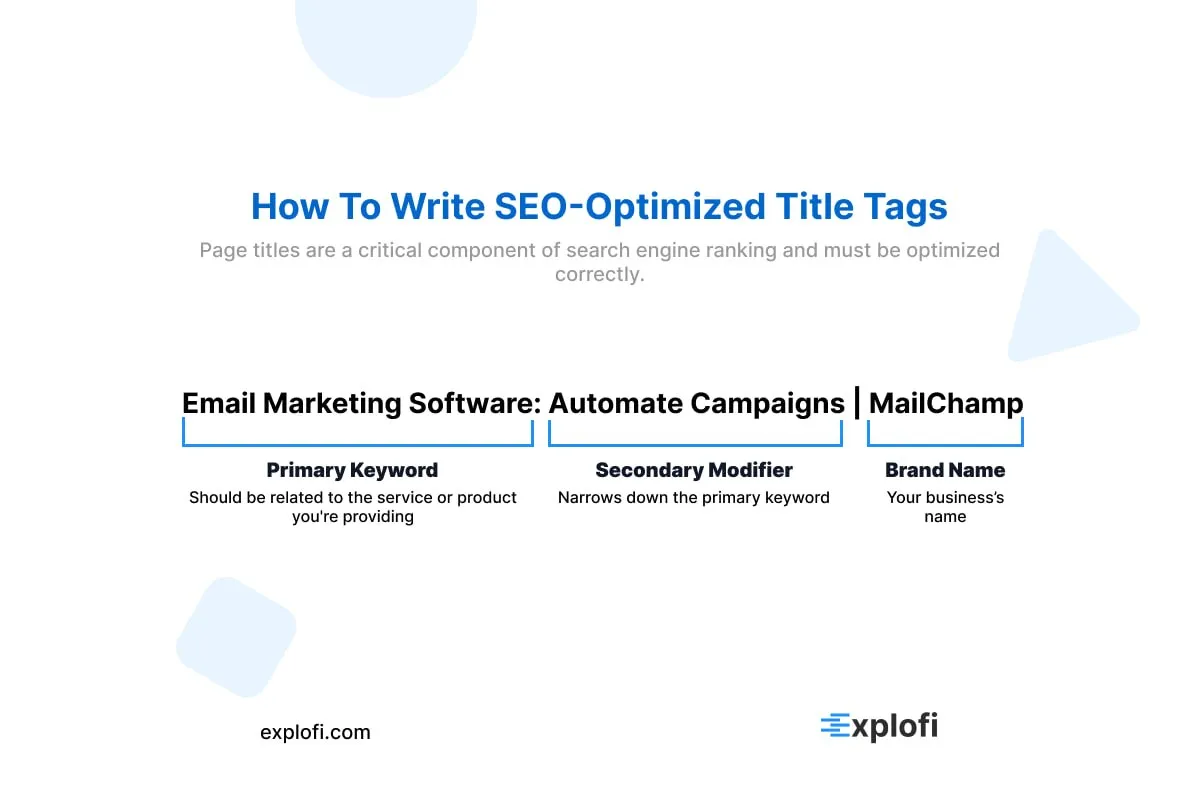
Your title tag should place the target keyword as close to the beginning as possible, since Google weights front-loaded terms more heavily. Keep tags between 50-60 characters, as anything beyond 60 gets truncated in search results. A strong structure follows this pattern:
- Primary keyword
- Secondary modifier
- Brand name
Each title tag must be unique across every page, since duplicate tags confuse crawlers and dilute ranking signals.
Making Title Tags Click-Worthy and Relevant
Power words like "proven," "exact," or "complete" increase click-through rates by up to 45%, according to CoSchedule data. A title tag becomes click-worthy when it matches user intent precisely rather than just stuffing a target keyword. For example, "5 Proven On-Page SEO Fixes That Double Organic Traffic" outperforms a flat keyword match because it signals:
- A specific outcome
- A countable deliverable
- Immediate relevance to the searcher's goal
Adding the Current Year to Boost Title Tag Freshness
Including the current year in your title tag signals freshness to both search engines and users. A title like "On-Page SEO Guide 2025" consistently outperforms its undated counterpart because Google favors regularly updated content. Studies show that refreshing your title tag to reflect the current year can increase click-through rates by up to 25%, as users searching for current information naturally gravitate toward recent results.
Using Emotional Triggers in Title Tags to Improve CTR
Words like "proven," "secret," "effortless," and "guaranteed" trigger psychological responses that push users to click. Studies show emotionally charged title tags can increase CTR by up to 40% compared to neutral phrasing. To make your content stand out in search results, consider pairing emotional language with your target keyword, such as:
- "Proven OnPage SEO Fixes That Double Organic Traffic"
- "The Secret to Writing Title Tags Users Can't Ignore"
- "Effortless SEO Strategy That Outranks Competitors Overnight"
How to Write Effective Meta Descriptions
Meta descriptions don't directly influence rankings, but they powerfully shape click-through rates, which indirectly affect your organic traffic. Keep your meta descriptions between 150-160 characters, since Google truncates anything longer in search results. Your target keyword must appear naturally within the description, as Google bolds matching terms when displaying results, making your listing visually stand out.
A well-crafted description acts as a micro-advertisement, directly increasing the percentage of users who click through.
Keeping Meta Descriptions Unique Across All Pages
Duplicate meta descriptions are a common pitfall that directly signals low content quality to search engines. Google's documentation explicitly states that identical meta descriptions across multiple pages make it harder to distinguish individual page relevance. To create unique meta descriptions for every page:
- Reflect each page's specific content, not the site's general topic
- Incorporate the page's target keyword naturally
- Match the search intent for that specific URL
Roughly 30% of pages crawled by Google contain duplicate meta descriptions.
Common Mistakes to Avoid When Writing Meta Descriptions
Exceeding Google's 155-160 character limit is among the most damaging errors, as truncated descriptions lose critical context. Equally problematic is writing vague, keyword-stuffed copy that ignores actual search intent. The most common mistakes include:
- Omitting the target keyword entirely
- Writing generic descriptions that fit multiple pages
- Using passive, weak language that reduces clickthrough rates
How to Optimize Your URL Slugs for SEO
URL slugs directly influence your organic traffic by signaling relevance to search engines. Keep slugs short, descriptive, and keyword-rich by following these practices:
- Remove stop words like "the," "and," or "of"
- Place your target keyword as close to the root domain as possible
- Use hyphens, not underscores, to separate words
Google reads hyphens as word separators, while underscores merge words entirely.
Best Practices for Creating Clean and Descriptive URLs
Keeping URLs lowercase prevents duplicate content issues, since servers may treat uppercase and lowercase versions as separate pages, splitting link equity. Stick to a simple structure like `/blog-post/target-keyword` to reinforce topical relevance. Studies show URLs under 60 characters perform measurably better in organic traffic, as shorter slugs are easier for both users and crawlers to process and index accurately.
How URL Structure Affects Search Rankings
Clean URL structure directly impacts how search engines interpret and rank your pages. Google's algorithm treats URL paths as ranking signals, meaning a cluttered or keyword-absent slug weakens your SEO strategy before content is even evaluated. Research shows that top-ranking pages on Google typically share these URL traits:
- Contain the exact target keyword
- Average 35 words in length
- Use hyphens as word separators
- Reflect the page's content hierarchy
How Explofi Helps Small Businesses Execute On-Page SEO Without Becoming an Expert
Understanding on-page SEO is one thing. Executing it consistently across every blog post, service page, and location page on your site is another. Most small businesses know they need optimized title tags, proper heading structure, and internal links but they never execute it consistently because it is tedious and time consuming to do manually.
Explofi handles the execution layer. When you create content inside Explofi it is generated with proper heading structure, keyword placement, meta content, and internal linking built in from the start. You are not retrofitting SEO onto content after the fact. You are building content that is structured correctly from the moment it is created. For small businesses that want the benefits of on-page SEO without spending hours optimizing every page manually Explofi is the execution system that makes it happen.
On-page SEO is not complicated. Executing it consistently across every page on your site is. Explofi helps small businesses create localized content with proper structure, keyword placement, and internal linking built in from the start. Start free today.
Frequently Asked Questions About On-Page SEO
What Are the Most Important On-Page SEO Factors?
The most important on-page SEO factors include optimizing title tags, meta descriptions, and header tags with relevant keywords. Content quality and keyword placement within the first 100 words also matter significantly. Additionally, URL structure, image alt text, and internal linking contribute to rankings.
How often should I update my on-page SEO?
On-page SEO is not a one-time setup. Title tags, meta descriptions, and content should be reviewed at minimum every six to twelve months or whenever Google releases a major algorithm update. Pages that were ranking well can drop if competitors publish stronger content or if your content no longer matches current search intent. A content refresh that updates headings, improves keyword placement, and adds internal links to newer posts is often enough to recover lost rankings without starting from scratch.
How many keywords should I target on one page?
Each page should target one primary keyword and two to four closely related secondary keywords. Trying to rank a single page for too many unrelated keywords dilutes its relevance signal and confuses search engines about what the page is actually about. Focus on one clear topic per page and use your secondary keywords naturally in subheadings and body content without forcing them. If you want to rank for additional keywords create separate pages targeting each one specifically.
Does on-page SEO work without backlinks?
On-page SEO can get you ranking for low-competition keywords without backlinks but it has limits in competitive markets. For local service businesses targeting city-specific keywords the competition is often low enough that strong on-page optimization combined with a fully optimized Google Business Profile and consistent content publishing can generate real rankings without a significant backlink profile. For highly competitive national keywords backlinks become increasingly necessary to push past established competitors with years of domain authority.
What is the difference between on-page SEO and content marketing?
On-page SEO focuses on optimizing the technical and structural elements of individual pages including title tags, meta descriptions, headings, URL structure, and internal links. Content marketing focuses on creating and distributing content that attracts and engages a target audience. The two overlap because well-written content that matches search intent is a core on-page SEO requirement. The distinction is that content marketing has broader goals including brand awareness and audience building while on-page SEO is specifically focused on helping individual pages rank in search results.
How do I know if my on-page SEO is working?
The clearest signals that your on-page SEO is working are ranking movement and organic traffic growth in Google Search Console. Specifically look at impressions and clicks for your target keywords over a 30 to 90 day period after making on-page changes. If impressions are growing but clicks are not that usually points to a meta description or title tag issue. If neither is moving the content may not be matching search intent closely enough or the page may have technical issues preventing proper indexing. The URL Inspection tool in Google Search Console is the fastest way to diagnose what Google is seeing on any specific page.