Deep Dive with AI
What Is a Local Keyword Tracker?
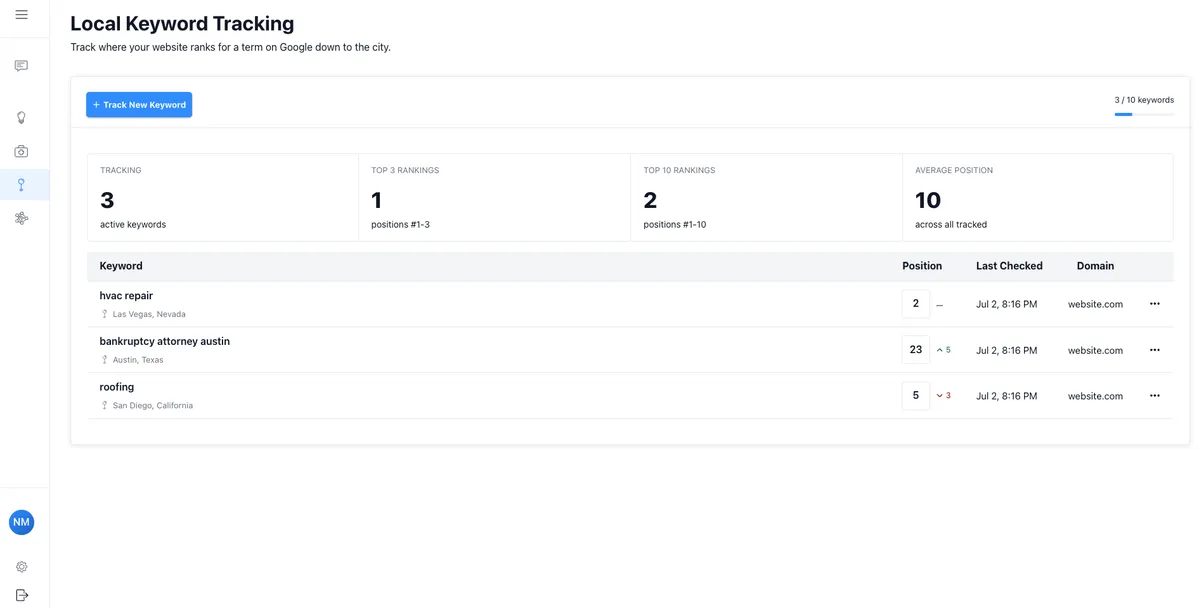
A local keyword tracker is a tool that monitors where your business ranks in local keyword rankings for location-specific search terms across Google and other search engines. Unlike broad national tracking, it zeroes in on how your pages perform within a specific city, neighborhood, or region. According to BrightLocal, 98% of consumers used the internet to find local businesses in 2022, making precise rank tracking critical.
These tools measure ranking shifts daily, track performance inside the local pack (the top three Google map results), and reveal how search behaviors shift across different zip codes, giving small business owners a granular, street-level view of their organic search visibility.
How Local Keyword Tracking Differs From Standard SEO Tracking
Standard SEO tracking monitors rankings across the entire country or broad regions, while local keyword tracking zeroes in on specific locations, like tracking "plumbing services near downtown Chicago" rather than just "plumbing services." Local searches also trigger the local pack, a Google feature showing the top three nearby businesses, which standard tracking completely ignores.
Why Small Businesses Need Dedicated Local Keyword Tracking Tools
Local searches drive 46% of all Google searches, yet most generic keyword tools fail to capture neighborhood-level ranking shifts that directly impact foot traffic. For a small business competing against national chains, tracking hyper-local keywords with precision determines visibility in the local pack, where the top three results capture the majority of clicks.
Dedicated local tracking tools monitor location-specific ranking fluctuations that broad platforms like Google Search Console simply cannot isolate.
The Role of Local Keyword Trackers in a Complete SEO Strategy
Local keyword trackers integrate directly into your broader local SEO framework by connecting search volume data with real-time ranking shifts. Rather than guessing which local keywords drive foot traffic, trackers pinpoint exactly which terms trigger the local pack, where 33% of clicks go to the top result according to BrightLocal research.
By pairing competitor analysis with keyword opportunities, small businesses identify low competition terms that larger brands overlook. Tracking search trends over time also reveals seasonal demand spikes, allowing businesses to adjust their content and Google Business Profile before traffic peaks hit.
Why Local Keyword Tracking Matters for Small Businesses
Local searches drive 46% of all Google searches, yet most small businesses still track keywords at a national level, missing the hyperlocal intent that actually converts. Unlike broad tracking, monitoring local keywords gives you visibility into exactly how nearby customers find your services. People searching "plumber near me" or "best coffee shop in Austin" carry far stronger purchase intent than generic queries, producing higher conversion rates across local results.
Research from Google confirms that 76% of people who conduct a local search visit a business within 24 hours. The local pack, those three prominent map listings appearing in a Google search result, captures the highest click-through rates on the page, making precise local rank tracking non-negotiable for small businesses competing in tight geographic markets.
How Local Search Rankings Directly Impact Foot Traffic and Revenue
Local searches drive 50% of mobile users to visit a store within a day, according to Google. Ranking in the local pack significantly amplifies this effect, as those top three map listings capture the majority of clicks. Consider what strong local SEO rankings deliver:
- Higher in store visit rates
- Increased phone inquiries
- Greater revenue from nearby customers
The Competitive Advantage of Monitoring Local Search Positions
Tracking local search positions reveals exactly where your business stands against local competitors, giving you data to outmaneuver them strategically. According to Google, 76% of local searches result in a store visit within 24 hours, meaning ranking higher in the local pack directly converts to foot traffic.
Monitoring shifts in local keywords lets you capitalize on competitor weaknesses instantly.
Understanding How Customers Find Local Businesses Online
46% of all Google searches have local intent, meaning nearly half of every query typed is someone looking for a business, service, or product nearby. Many of these searches use explicit keywords like "plumber near me" or implicit keywords tied to a specific neighborhood, which trigger the local pack results.
A fully optimized Google Business Profile significantly increases visibility in these results, as Google cross-references business details against local searches to determine ranking relevance.
What Are Local Keywords?
Local keywords are search terms that combine a service or product with a geographic indicator, like "coffee shop in Austin" or "emergency plumber near me." These terms signal local search intent, meaning the searcher wants results within a specific area. According to Google, 46% of all searches have local intent, making these local modifiers critical for small businesses trying to capture nearby, high-converting traffic.
Implicit vs. Explicit Local Keywords
Explicit local keywords directly state a location, like "plumber in Austin," while implicit local keywords signal local search intent without naming a place, such as "plumber near me." According to Google, 30% of mobile local searches relate to location, and implicit keywords dominate that share, making search intent as critical as the location modifier itself.
Types of Local Keywords Small Businesses Should Target
Targeting the right types of local keywords means distinguishing between explicit and implicit keywords. Explicit local keywords directly name a location, like "bakery in Austin," while implicit keywords rely on search intent, such as "bakery near me." Local searches with "near me" have grown over 500% in recent years.
Relevant keyword modifiers like "best," "affordable," or "open now" sharpen targeting further:
- Explicit location based keywords
- Implicit "near me" keywords
- Service specific local keywords
How Google Interprets Local Search Intent
Google processes over 8.5 billion searches daily, and roughly 46% of those carry local intent, meaning users are searching for something near them. When someone types "coffee shop open now," Google reads signals like proximity, relevance, and prominence to surface results. A fully optimized Google Business Profile directly influences which businesses appear in the local pack, since Google cross-references your profile details against local searches to determine ranking placement.
Key Metrics to Monitor With a Local Keyword Tracker
Tracking the right metrics through a local keyword tracker gives small businesses a measurable edge in local SEO. Search volume is one of the most telling indicators, as keywords with 100 to 1,000 monthly searches in a specific local area often signal strong buying intent without overwhelming competition.
Paired with search volume, the competition level of your local keywords reveals how difficult ranking will actually be, with scores below 0.3 on most platforms indicating realistic opportunities. Monitoring your position within the local pack is equally critical, since studies show that the top three local pack results capture over 75% of all clicks from local searches, making rank movement a direct signal of visibility shifts.
Keyword Position and Ranking Changes Over Time
Tracking your primary keyword positions week over week reveals patterns that single-point snapshots completely miss. A keyword ranking at position 8 today may have climbed from position 23 just 30 days prior, signaling momentum worth doubling down on. According to BrightLocal, 98% of consumers used the internet to find local businesses in 2023, making ranking trajectory as critical as current position.
Monitoring local keywords over rolling 90-day windows helps identify seasonal fluctuations and algorithm update impacts before they erode hard-earned visibility.
Search Volume and Local Traffic Estimates
Search volume tells you how often people look for a specific term each month, but local traffic estimates narrow that data to your city or region. Using Google Keyword Planner, small businesses can filter search volume by location, revealing whether 50 or 5,000 people search a term nearby. Lower local search volume, typically under 500 monthly searches, often signals higher purchase intent from nearby customers.
Click-Through Rates for Local Search Results
Local search CTR varies significantly by position, with the top Google Maps result capturing around 44% of clicks, according to research from BrightLocal. Tracking CTR through a local keyword tracker reveals which local keywords are driving engagement versus impressions alone. Key factors that influence local search CTR include:
- Accurate meta descriptions
- Star ratings from customer reviews
- Optimized Google Business Profile details
Google Business Profile Visibility Metrics
Tracking your google business profile visibility means measuring direct searches (customers searching your exact business name) versus discovery searches (customers finding you through local searches like "plumber near me"). According to Google, 84% of Business Profile views come from discovery searches, making local keywords tied to your profile's primary category the most critical ranking signals to monitor.
How to Find the Right Local Keywords for Your Small Business
Finding the right local keywords starts with understanding how your customers actually search. According to Google, 46% of all searches have local intent, meaning people are actively looking for businesses near them. Starting with seed keywords like "coffee shop" or "plumber" gives you a foundation, then expanding into local keywords by adding geographic modifiers like neighborhood names or zip codes sharpens your targeting.
Google Keyword Planner reveals monthly search volumes for these keyword variations, helping you identify which terms drive real traffic. Targeting phrases with 50 to 500 monthly local searches often yields stronger conversion rates than chasing high-volume national terms, since the competition is lower and the searcher's intent is far more specific.
Step 1: Brainstorm Core Products and Services
Listing your core products and services generates the seed keywords that anchor your entire local SEO strategy. Think specifically, like "custom wedding cakes" rather than "bakery," since 46% of all Google searches carry local intent. From that list, map each offering to the problems customers actually search for, turning broad terms into specific keywords with measurable search demand.
Step 2: Add Location-Based Modifiers to Seed Keywords
Location-based modifiers transform generic seed keywords into targeted local keywords that capture neighborhood-level search intent. For example, pairing "plumber" with "Austin, TX" or "plumber near downtown Chicago" can increase search relevance significantly, given that 46% of all Google searches have local intent.
Combining city names, ZIP codes, and neighborhood identifiers with your seed keywords helps local businesses surface in the specific searches that actually convert into customers.
Step 3: Research Competitor Keywords in Your Local Market
Analyzing competitor keywords reveals gaps and opportunities in your local market that are otherwise hard to spot. Tools like Google Keyword Planner let you enter a competitor's website URL to surface their top-performing local keywords. From there, focus on:
- Keywords with high local search volume but low competition
- Location specific longtail keywords competitors rank for
- Relevant keywords tied to services you both offer
This narrows your targeting to what already converts locally.
Step 4: Find Questions and Long-Tail Keywords Your Customers Are Asking
Long-tail keywords convert 2.5 times more than generic terms, according to WordStream. Tools like Google Keyword Planner surface question-based local keywords such as "affordable plumber open weekends near me," which reflect informational intent and mirror how customers naturally search during decision-making.
Step 5: Cross-Check and Expand Your Keyword List Using AI Tools
AI tools like ChatGPT or Semrush's AI features can generate dozens of local keywords by analyzing search intent and geographic patterns. Cross-checking these suggestions against Google Keyword Planner confirms actual search volume, filtering out low-traffic terms. Specifically, targeting keywords with 100 to 1,000 monthly local searches typically yields the most competitive opportunities for small businesses.
How to Set Up a Local Keyword Tracker for Your Business
Starting with your Google Business Profile is the most effective entry point for setting up a local keyword tracker. Your profile's business description and categories signal to Google which local searches your business should appear in, making it a foundational data source. From there, Google Keyword Planner helps you identify high-volume local keywords tied to your specific service area, filtering results by city or region for precision.
Tools like Google Trends layer on search behavior patterns over time, revealing seasonal shifts in demand. A good rule of thumb is tracking between 10 and 20 hyper-local keywords, such as "plumber in downtown Chicago," to keep your data focused and actionable without spreading your analysis too thin.
Choosing the Right Geographic Location Settings
Targeting the right city, neighborhood, or zip code in your tracking tool directly shapes which local searches your rankings appear in. Most keyword trackers let you set locations down to the city level, and tools like Google Keyword Planner refine this further by filtering search volume data by region.
For hyper-local accuracy, setting your location to a specific borough or district, rather than a broad metro area, surfaces more precise local keywords with less competition.
Organizing Keywords by Service Area or Business Category
Grouping your local keywords by service area or business category creates a structured tracking system that directly improves local SEO performance. For a plumbing business serving multiple neighborhoods, separate keyword folders by location, such as "emergency plumber Downtown" versus "pipe repair Midtown," keep data clean and actionable.
Useful categories to build include:
- Service type (repairs, installations, consultations)
- Geographic zone (neighborhood, city district)
- Business category (residential, commercial)
This separation helps you prioritize keywords that drive the highest local searches efficiently.
Configuring Rank Tracking Frequency and Alerts
Daily tracking suits competitive local keywords, while weekly intervals work for stable, low-competition terms. Setting alert thresholds at 5-position rank drops ensures timely responses to ranking shifts. Most local SEO tools let you configure location-specific tracking, targeting local searches within a defined radius to capture hyper-relevant ranking data.
How Local Rankings Differ From Standard Organic Rankings
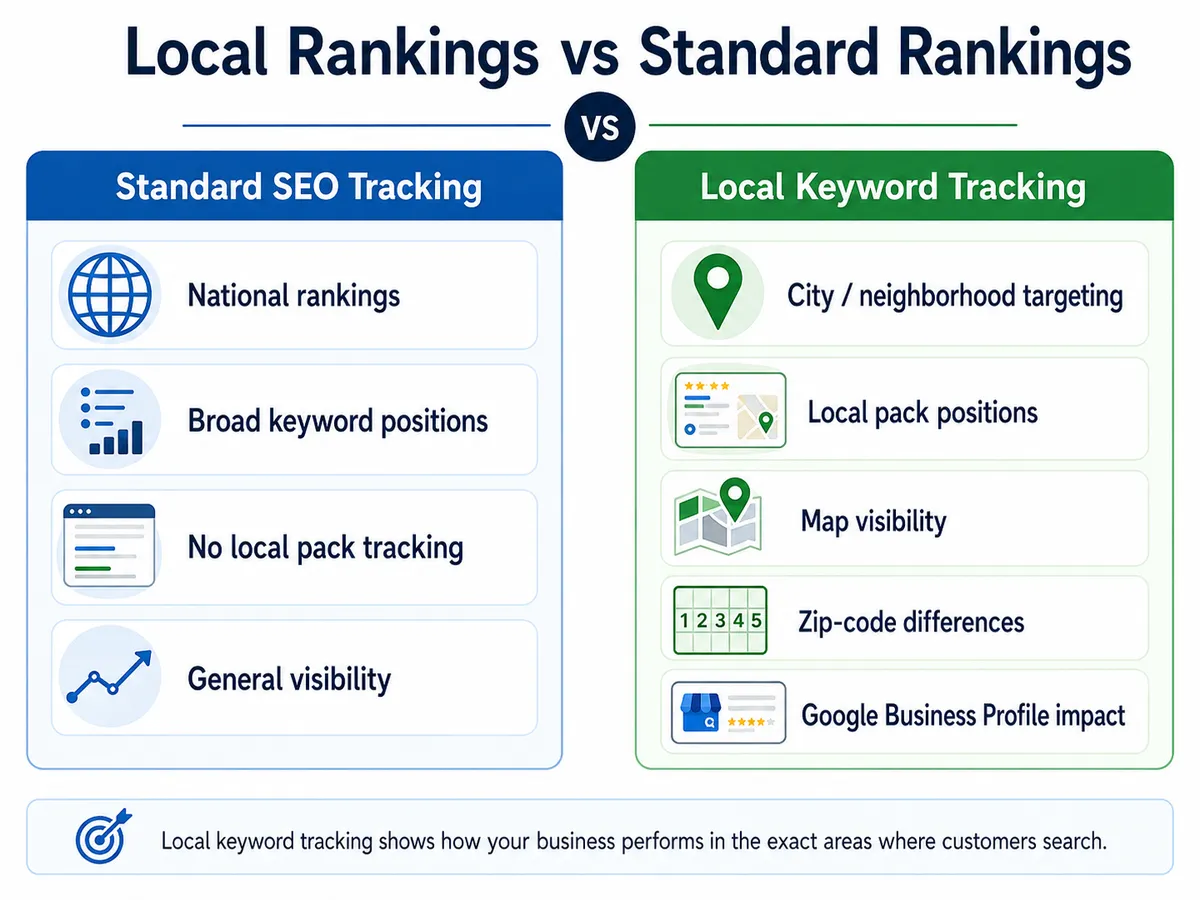
Local rankings factor in geographic proximity, relevance, and prominence, unlike standard organic rankings that rely purely on domain authority and backlinks. Specifically, local searches trigger Google's Map Pack, a separate three-listing display appearing above organic results. Optimizing your Google Business Profile directly influences this placement, making local SEO fundamentally different from traditional search optimization.
The Impact of the Google Local Pack on Search Visibility
The Google Local Pack captures three business listings at the top of local searches, and research shows it attracts 44% of all clicks on a search results page. Unlike standard organic rankings, appearing here depends heavily on your Google Business Profile optimization, proximity signals, and local authority, making it a distinctly different visibility battleground.
Why the Same Keyword Can Show Different Results in Different Zip Codes
Google's local search algorithm pulls ranking data based on the searcher's precise location, meaning a query like "best pizza shop" typed in zip code 10001 returns entirely different results than the same query in 10003, just half a mile away. Local searches are heavily influenced by proximity signals, and Google weights businesses within tighter geographic radiuses more heavily, directly affecting which local businesses appear.
How Google My Business Listings Affect Local Rank Tracking Data
A Google Business Profile directly shapes how local rank tracking tools interpret position data. Unlike standard organic results, local rankings pull from three distinct signals:
- Business name consistency
- Proximity to the searcher
- Review velocity and volume
Tracking tools like BrightLocal measure these separately, meaning a listing with incomplete opening hours can show ranking volatility of up to 15% week-over-week.
Keyword Tracking for Small Businesses
Local keyword tracking isn't about chasing vanity rankings, it's about knowing exactly which searches are putting your business in front of nearby customers who are ready to buy. Guessing your way through local SEO wastes time small businesses don't have. Explofi's Local Keyword Tracker pinpoints where you actually rank in your state and city, so you can double down on what's working and fix what isn't. Start tracking your local rankings for free.