Deep Dive with AI
What Is a Google Business Profile and Why It Matters for Local SEO
A Google Business Profile is a free business listing that appears when potential customers conduct local searches on Google or Google Maps, displaying critical details like your business hours, business address, phone number, and reviews. Unlike traditional SEO, which focuses on ranking web pages broadly, a Google Business Profile targets hyper-local visibility, directly influencing whether nearby buyers find your business first.
According to Google, businesses with complete profiles are 70% more likely to attract location visits and 50% more likely to lead to a purchase. This makes your profile one of the most direct lines between local search visibility and actual foot traffic, operating as a structured snapshot of your business within Google's local ecosystem.
The Role of GBP in Local Search Visibility
A fully optimized Google Business Profile directly influences local rankings by signaling relevance, proximity, and prominence to Google's algorithm. According to BrightLocal, 98% of consumers used the internet to find local businesses in 2023. Your profile feeds directly into Google's Local Pack, a highly competitive three-listing display that captures the majority of local search clicks before users ever reach organic results.
How Google Business Profile Has Evolved in 2026
Google Business Profile has undergone significant changes heading into 2026, shifting from a static directory listing into a dynamic local SEO tool. Google now prioritizes profiles with real-time data, rewarding businesses that regularly update their information with stronger placement in relevant searches.
Key updates include:
- AI-powered review summaries visible directly in Google Search
- Expanded product and service menus
- Deeper integration with Google Maps for local buyers
- New verification options for service area businesses
These changes mean an incomplete or outdated Google Business Profile now carries a measurable ranking penalty, directly reducing visibility among potential customers.
Key Differences Between Google Business Profile and Traditional SEO
Traditional search engine optimization targets your website's authority, backlinks, and on-page content to influence rankings across broad search queries. A Google Business Profile, by contrast, operates within a completely separate ranking system called the Local Pack, where proximity, relevance, and prominence determine visibility.
Unlike conventional SEO, which can take months to show movement, optimizing a Google Business Profile can shift local rankings within weeks. For local businesses, the profile essentially functions as a standalone landing page inside Google Maps, making your physical location and operating hours immediately visible without a user ever visiting your website.
How Google Determines Local Rankings in 2026
Google ranks local businesses using three core signals: relevance, distance, and prominence. Relevance measures how well your Google Business Profile matches what someone searches for, which is why selecting the right business category and secondary categories matters so much. Distance factors in how far your business location is from the searcher, though Google can override proximity when a competitor's profile carries stronger relevance signals.
Prominence draws from your review profile, citation consistency across business directories, and overall online authority. According to Google's own documentation, these three factors work together rather than independently, meaning a business two miles further away can outrank a closer competitor with a stronger, more complete profile.
Relevance: Matching Search Intent to Your Business
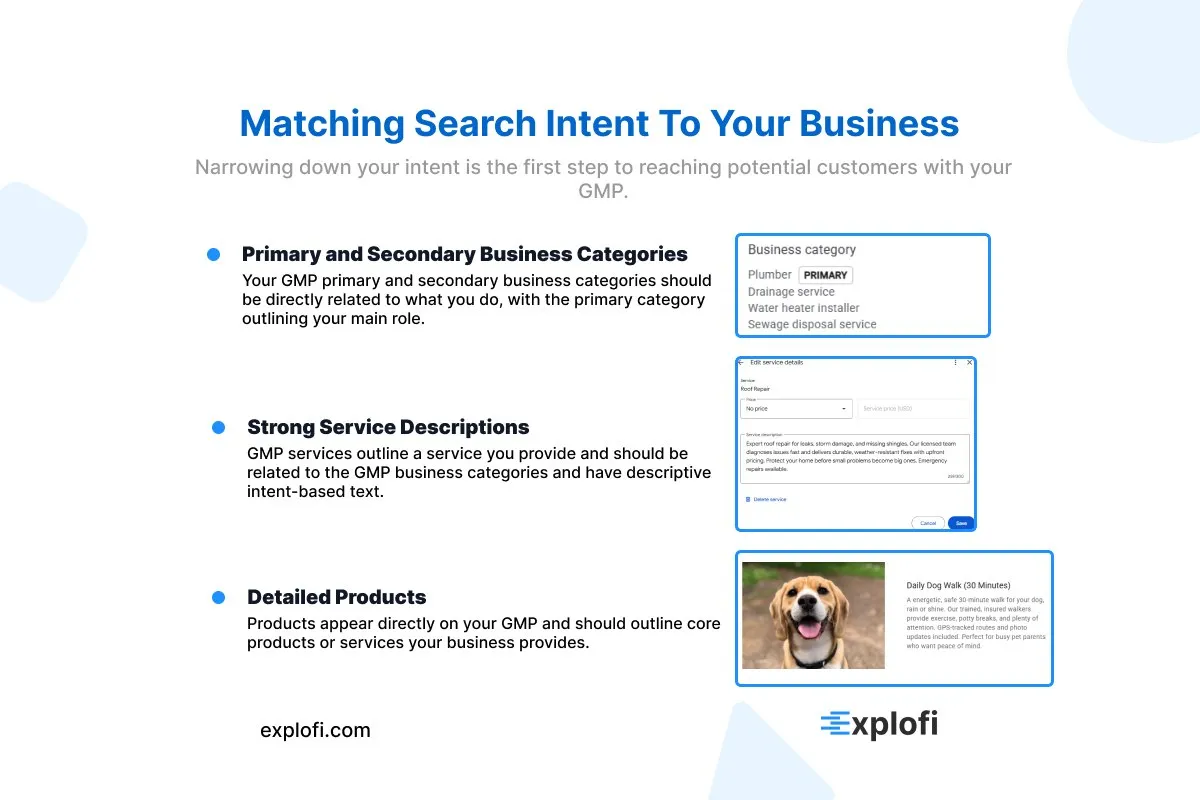
Relevance measures how well your Google Business Profile matches what someone is actually searching for. When people search "emergency plumber open now," Google cross-references your listed services, business categories, and relevant keywords in your profile against that query. Profiles that precisely mirror the searcher's intent rank higher.
This alignment depends on three specific elements:
- Primary and secondary business categories
- Service descriptions containing search matching language
- Products or services listed with detailed, intent-specific descriptions
Proximity: How Distance Affects Your Local Ranking
Proximity is one of the most uncontrollable ranking factors in local SEO, since Google calculates the physical distance between a searcher's location and your registered business address in real time. A coffee shop two blocks away will almost always outrank one that is two miles away for the same query.
For local businesses with a fixed storefront, this means your address placement matters enormously, particularly in dense urban markets where dozens of competitors operate within the same radius:
- Google uses device GPS, IP address, and WiFi triangulation to pinpoint searcher location
Prominence: Building Your Online Reputation and Authority
Prominence measures how well-known and trusted your business appears across the web. Google evaluates positive reviews, backlink volume, citation consistency, and mentions across social media platforms to calculate this score. Businesses averaging above 4.2 stars with over 50 reviews consistently outrank competitors with fewer signals.
Negative reviews without responses actively damage this score, since Google's algorithm weighs owner engagement. Citation accuracy across directories like Yelp, Bing Places, and Apple Maps reinforces your online presence, with NAP (name, address, phone) consistency being a measurable ranking input Google cross-references constantly.
What Changed for Google Business Profile in 2026
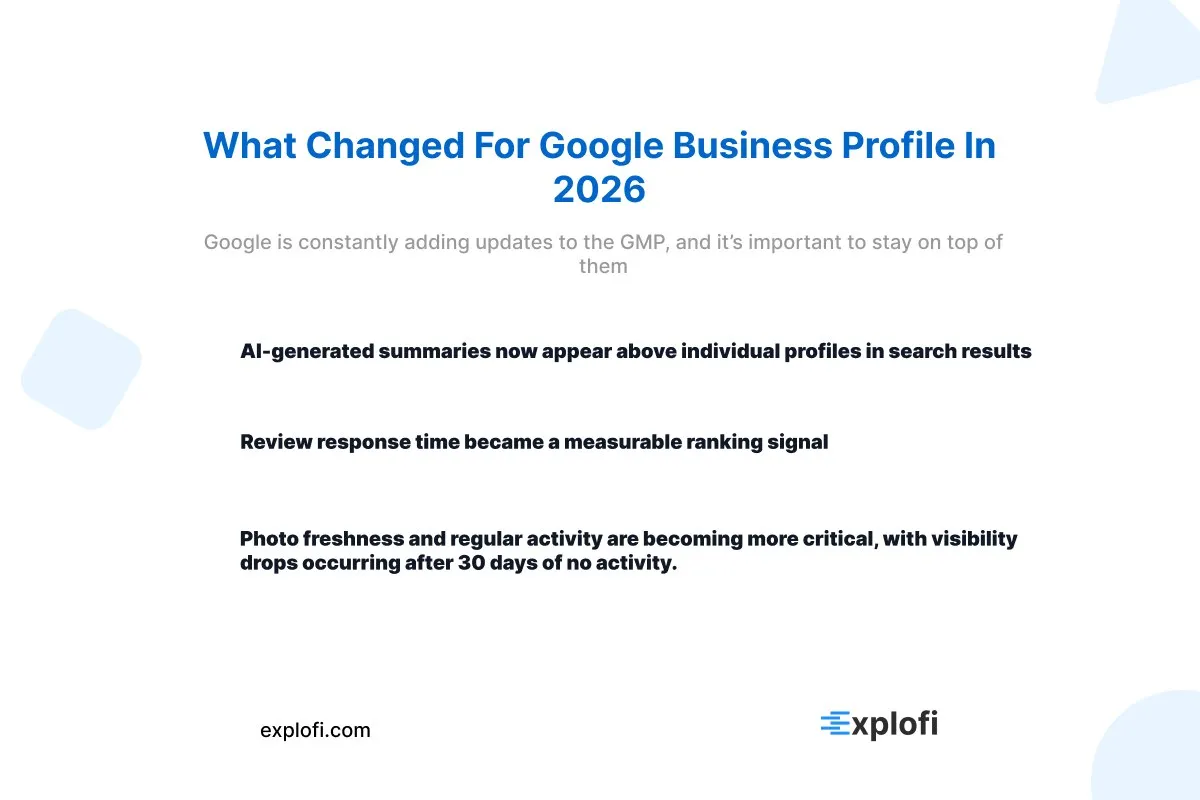
Google rolled out several significant updates to Google Business Profile in 2026 that directly affect how local businesses compete for visibility. The most impactful changes include:
- AI-generated summaries now appear above individual profiles in search results
- Review response time became a measurable ranking signal
- Photo freshness and regular activity are becoming more critical, with visibility drops occurring after 30 days of no activity.
These updates shifted what "optimization" actually means in practice. Posting updates consistently, for example, now carries more algorithmic weight than it did previously, directly influencing whether a local business profile matches high-intent queries. Profiles left inactive for extended periods saw measurable drops in local SEO rankings, making maintenance a core part of any serious digital strategy.
AI-Powered Search and Its Impact on Local Businesses
AI-powered summaries now filter what potential customers see before they ever reach individual listings, compressing visibility into a single generated answer. For local businesses, this shift means Google's AI evaluates profile completeness, review sentiment, and response time to determine which businesses surface inside those summaries.
Profiles with sparse catalogs, outdated photos, or slow review responses are consistently excluded. Key factors like 90-day photo uploads and catalog completion directly influence whether a business appears in AI-generated results or gets buried beneath competitors.
AI-powered summaries now filter what potential customers see before they ever reach individual listings, compressing visibility into a single generated answer. For a deeper look at what it takes to show up in ChatGPT and Google AI Overviews as a local business, the same profile completeness and NAP signals covered here play a direct role.
The Shift From the 3-Pack to Contextual Local Results
Google's local search display shifted away from the rigid 3-Pack format in 2026, moving toward contextual local results that adapt based on search intent, device type, and real-time user behavior. Rather than always showing three fixed business listings, search engines now surface results dynamically, meaning a query like "emergency plumber" triggers a different layout than "plumber near me."
This directly affects local businesses because visibility no longer depends solely on ranking position but on how well a Google Business Profile matches the specific context of each search:
- Intent type (informational vs. transactional)
- Device and location signal accuracy
- Time-sensitive relevance factors
Google's Gemini Integration and Ask Maps Features
Gemini's integration into Google Maps introduced "Ask Maps," a conversational AI feature that lets users query local businesses by describing needs rather than typing keywords. A prompt like "quiet coffee shop with fast Wi-Fi for remote work" now surfaces profiles based on attribute completeness. Businesses listing verified amenities, special offers, and detailed service descriptions gain direct exposure through these AI-driven conversational results.
Claiming and Verifying Your Google Business Profile
Claiming your Google Business Profile is the foundational step that directly determines whether your business appears as a potential search result across Google Search and Google Maps. To claim a listing, you navigate to Google Business Profile Manager, search for your business, and request ownership, a process that triggers Google's verification sequence.
Verification typically happens through a postcard mailed to your registered address, containing a five-digit PIN that must be entered within 30 days or the request expires. Some businesses qualify for phone or email verification, which resolves within minutes. Until verification completes, key details like your phone number, website URL, and business category remain uneditable, leaving your profile incomplete and effectively invisible to local SEO ranking signals.
Step-by-Step Process to Claim Your Existing Listing
Signing into Google with the account you want tied to your listing is the starting point. From there, navigate to google.com/business and search your business name to locate the existing profile. Once found, select "Claim this business" and choose a verification method. Google typically offers these options:
- Postcard by mail (57 days)
- Phone or text verification
- Email verification
- Video recording verification
Completing ownership through your Google Business Profile locks out unauthorized edits and gives you full control over how local businesses appear across Google Maps and search results.
How to Verify Your Business Through Google's Current Methods
Google currently offers several verification methods for your Google Business Profile, each designed for different business types. Video verification is now the most common method, requiring a recorded walkthrough that shows your storefront, interior, and proof of operation. Phone and email verification remain available for eligible accounts, delivering a code you enter directly into the dashboard.
Businesses with multiple locations can access bulk verification once ten or more listings exist under one account. Postcard verification, though slower, is still issued to certain business categories, delivering a five-digit PIN by mail within 14 days to confirm your physical address.
What to Do If Your Verification Is Delayed or Rejected
When a Google Business Profile verification is delayed or rejected, there are specific steps to resolve it:
- Check for policy violations under Google's content guidelines
- Confirm your phone number and address match exactly across all listings
- Request a new verification code if the postcard PIN expires after 30 days
- Submit a video reverification through the dashboard if the original attempt failed
Rejected profiles often stem from mismatched business information across platforms, which triggers automated flags in local SEO audits.
Completing Every Section of Your Google Business Profile
Filling out every field in your Google Business Profile directly impacts how potential customers discover and evaluate your listing. Profiles with complete information, including business hours, service areas, and product descriptions, receive significantly more engagement than incomplete ones. The "Services" section, for example, lets you break down individual offerings with prices attached, which builds trust before a prospect ever visits your site.
Attributes like "wheelchair accessible" or "free Wi-Fi" feed directly into AI-filtered search results on Google Maps. The "Frequently asked questions" section lets you preemptively answer common buyer objections, reducing friction in the purchasing decision. Your business description allows 750 characters, so use all of them with keyword-rich, specific language about what you offer.
Business Name, Address, and Phone Number Consistency
NAP consistency, meaning your business name, address, and phone number across all listings, directly impacts local SEO rankings. Search engines cross-reference your details across directories, your website, and your Google Business Profile, flagging mismatches as trust signals. BrightLocal research shows inconsistent citations can suppress local rankings noticeably.
Common inconsistencies that hurt rankings include:
- Abbreviating "Street" as "St." in one listing but spelling it out elsewhere
- Using a local number on Google but an 800 number on Yelp
- Listing a former business name on older directories
Setting Your Service Areas and Business Hours Accurately
Defining your service areas precisely within your Google Business Profile directly influences how well you appear on Google Maps for location-based searches. Google recommends setting no more than 20 service areas per profile, keeping each region within a two-hour driving radius of your business address.
For business hours, accuracy matters year-round, including special hours for holidays, since profiles with outdated hours frustrate potential customers and signal neglect to search engines. A properly configured profile should include:
- Accurate primary and secondary service zip codes or cities
- Regular weekly hours with holiday hour overrides
- Special hours for seasonal closures or extended operations
Adding Special Hours for Holidays and Temporary Closures
Google automatically notifies potential customers when holiday hours differ from regular schedules, making accurate special hour entries critical. Through your Google Business Profile dashboard, you can set specific closure dates, reduced hours, or extended seasonal windows individually. For example, marking Christmas Day as closed prevents customer frustration from wasted trips.
Regularly reviewing these entries quarterly ensures your profile reflects real operating conditions accurately.
Keeping Contact Information and Website Links Up to Date
Outdated contact details or broken website links can quietly suppress your local SEO performance. Audit your Google Business Profile regularly by checking these critical fields:
- Phone number formatted consistently (local area code preferred over toll-free)
- Primary website URL returning a 200 status code
- Appointment or booking links resolving correctly
Google's guidelines specify that inaccurate information reduces profile trustworthiness, directly affecting how search engines rank your listing.
Choosing the Right Primary and Secondary Categories for Local SEO
Selecting the right primary category is one of the most impactful decisions you can make for your Google Business Profile, as it directly signals to search engines what your business does at its core. Google uses your primary category to determine which searches trigger your listing, meaning a misaligned category can completely exclude you from relevant results.
Research from BrightLocal found that businesses with optimized categories are 5x more likely to receive clicks. Your primary category should reflect your single most specific service, while secondary categories expand your visibility across related searches. When building out categories, consider these distinctions:
- Primary category: your most specific core service
- Secondary categories: adjacent services you actively offer
- Avoid broad categories that dilute local SEO relevance
Why Your Primary Category Is the Most Critical Ranking Factor
Google's own documentation confirms that the primary category carries more weight than any other profile field in determining local search placement. Research from BrightLocal found that businesses appearing in the local pack almost universally have a primary category that precisely matches the searcher's query.
For local businesses, even a one-level mismatch matters, such as choosing "Law Firm" over "Personal Injury Attorney." The primary category influences:
- Keyword relevance matching
- Local pack eligibility
- Google Maps ranking signals
How to Research and Select the Best Secondary Categories
Competitor analysis is one of the most reliable methods for identifying strong secondary categories. Search your service type on Google Maps, pull up top-ranking competitors, and use tools like GMB Everywhere to reveal their exact category selections. Businesses using 3-5 relevant secondary categories see measurable gains in local SEO visibility.
Cross-reference those categories against your actual services to ensure alignment with what potential customers are actively searching for.
Common Mistakes Businesses Make When Choosing Categories
Overloading a profile with broad categories is one of the most damaging mistakes local businesses make. Common errors include:
- Choosing "Business Center" over "Co-working Space"
- Selecting "Restaurant" instead of "Sushi Restaurant"
- Using "Lawyer" rather than "Criminal Defense Attorney"
These mismatches push profiles away from high-intent searches, directly reducing clicks from potential customers seeking specific services.
Writing a Compelling and Keyword-Rich Business Description
Your Google Business Profile description gives you 750 characters to communicate exactly what your business does, who it serves, and why it ranks. Weave in natural phrases that mirror what potential customers type into search engines, like "emergency plumber in Austin" rather than generic terms. A well-crafted description should include:
- Your core service or product
- A specific geographic area
- A unique value proposition
Avoid keyword stuffing, as Google's quality guidelines penalize it.
How to Structure Your GBP Description for Maximum Impact
Place your strongest value proposition in the first 250 characters, since Google truncates descriptions at that point before showing a "read more" prompt. Structure the remaining characters to naturally weave in location-specific services and unique differentiators. For local businesses, a proven format includes:
- Lead with what you do and where
- Highlight a specific result or credential
- Reference a core service using a natural keyword phrase
Naturally Incorporating Local and Service-Based Keywords
Phrases like "Google Maps-optimized roofing contractor in Austin" or "emergency plumber serving downtown Chicago" mirror how real users search, which directly impacts local SEO rankings. According to BrightLocal, 76% of local searches result in a profile visit, meaning keyword placement in your description actively drives traffic.
Weaving service-based terms into natural sentences, rather than listing them, keeps your content within Google's quality guidelines.
What Google Prohibits in Your Business Description
Google explicitly bars several content types from business descriptions. Promotional language like "best prices" or "call now" violates their guidelines, as does URLs, phone numbers, and HTML code. Beyond formatting, Google prohibits misleading claims that misrepresent your services, which can trigger profile suspension.
For local businesses, stuffing descriptions with irrelevant location names to manipulate local SEO rankings also violates policy. Google's content guidelines further restrict profanity, legally sensitive content, and anything that constitutes duplicate content lifted from other sources.
How Explofi Helps Local Businesses Build the Content That Supports Their Google Business Profile
Your Google Business Profile gets you found on Maps. But the businesses that dominate local search in 2026 are the ones pairing an optimized profile with localized service pages, blog content, and topical maps that reinforce their authority across the entire search ecosystem.
Explofi helps small businesses build that content layer. When you create content inside Explofi it is generated around your specific business type, location, and competitors so every service page and blog post strengthens the same local SEO signals your Google Business Profile is building. Your profile tells Google you exist. Your content tells Google you deserve to rank above everyone else in your city.
Ready to build the content that makes your Google Business Profile work harder? Start free with Explofi today.
Frequently Asked Questions
What Is a Google Business Profile and Why Does It Matter for Local SEO?
A Google Business Profile is a free listing that appears when customers search for your business or your service category on Google Search and Google Maps. It displays your business name, address, phone number, hours, reviews, and photos directly in search results without the customer needing to visit your website. For local SEO, it is the single most important asset you control because Google uses your profile to determine whether your business appears in the Local Pack, the three-listing display that captures the majority of local search clicks. Businesses with complete and actively managed profiles consistently outrank competitors with incomplete or neglected listings.
How Do I Optimize My Google Business Profile for Local SEO?
Start by claiming and verifying your profile, then complete every single field, including your primary and secondary business categories, service area, business hours, phone number, website URL, and business description. Upload high quality photos and add them regularly since Google rewards profile freshness. Build a consistent review strategy so you are generating new reviews and responding to them within 24 hours. Post updates at least once per week to signal activity to Google. Make sure your business name, address, and phone number match exactly across every online directory and citation source. Each of these steps contributes to the three core local ranking signals Google uses which are relevance, proximity, and prominence.
How Long Does It Take to See Results from Optimizing a Google Business Profile?
Most local businesses see movement in their Google Maps and local pack rankings within 4 to 8 weeks of fully optimizing their Google Business Profile. Unlike traditional SEO, which can take 6 to 12 months, Google Business Profile optimization works faster because Google already has your business in its system and is simply evaluating how complete and active your profile is. Filling out missing fields, adding photos, generating new reviews, and posting regular updates can all trigger faster ranking movement. The timeline varies depending on how competitive your local market is and how many signals your competitors have built up over time.
How Many Reviews Do I Need to Rank in the Local Pack?
There is no fixed number of reviews required to rank in the local pack, but research from BrightLocal consistently shows that businesses averaging above 4.2 stars with more than 50 reviews outrank competitors with fewer signals in most markets. The quality and recency of reviews matter as much as the total count. A business with 200 older reviews and no recent ones can be outranked by a competitor with 60 reviews posted in the last 90 days. Google also weighs how quickly you respond to reviews as a ranking signal, so responding within 24 hours is part of a competitive review strategy.
Does My Google Business Profile Affect My Website's SEO Rankings?
Your Google Business Profile and your website's organic SEO rankings operate in separate but connected systems. Your profile primarily influences your placement in the Local Pack and Google Maps results, while your website influences your organic ranking positions below the map. The two systems do reinforce each other, though. A strong Google Business Profile builds prominence signals that can indirectly improve your website's local SEO authority. Citation consistency across your profile and other directories also strengthens the trust signals that influence both local pack and organic rankings simultaneously.
What Are the Most Common Google Business Profile Mistakes Small Businesses Make?
The most common mistakes are choosing a primary category that is too broad and does not match the specific service customers are searching for, leaving the business description field generic or empty, not uploading photos regularly, ignoring or not responding to reviews, and having inconsistent business name, address, or phone number information across different directories. Another common mistake is not setting up service areas correctly for businesses that serve customers at their location rather than at a fixed address. Each of these errors sends weak signals to Google and directly reduces your visibility in local search results compared to competitors who have their profile fully optimized.