Deep Dive with AI
Why Google Sees a Blank Page on Your Lovable Site
Lovable builds client-side React apps by default, meaning the initial HTML sent to Google's crawler is essentially empty. When Google crawls your site, it receives a bare-bones HTML shell with a single `<div id="root"></div>` and a script tag, but no actual content. While Googlebot can execute JavaScript, it processes client-side rendering in a second wave that can take days or even weeks, according to Google's own documentation.
During that delay, your lovable sites are completely invisible to search rankings. Unlike static HTML, where content is immediately readable, JavaScript rendering forces Google to queue your pages separately, and that queued content is indexed far less reliably than rendered HTML delivered on the first request.
The Client-Side Rendering Problem Explained
Google's crawler operates on a two-wave rendering system, where the second wave, reserved for JavaScript-heavy pages, can delay indexing by weeks. For lovable sites, this means the rendered HTML that contains your actual content arrives far too late. According to Google Search Central, Googlebot deprioritizes JavaScript rendering, making lovable SPAs structurally incompatible with consistent, reliable indexing.
How JavaScript-Heavy Frameworks Hide Your Content From Crawlers
Frameworks like React defer all content rendering until JavaScript runs in the browser, which AI crawlers and Googlebot cannot always complete. This creates three core problems:
- No meaningful content in the initial HTML response
- Meta tags and headings load too late to be parsed
- Rendered HTML arrives after crawl budget is already spent
Why Googlebot Struggles to Execute React-Based Lovable Apps
Googlebot allocates a strict crawl budget, and React-based lovable sites burn through it inefficiently. Because JavaScript must fully execute before any content appears, Googlebot's rendering queue absorbs the processing cost rather than the initial crawl. The rendered HTML arrives only after that queue clears, which Google's own documentation confirms can span several weeks.
This execution gap specifically penalizes:
- Dynamic routing
- State-dependent content
- Component-driven page structures
The Fast Diagnosis: Is Google Actually Seeing Your Lovable Site?
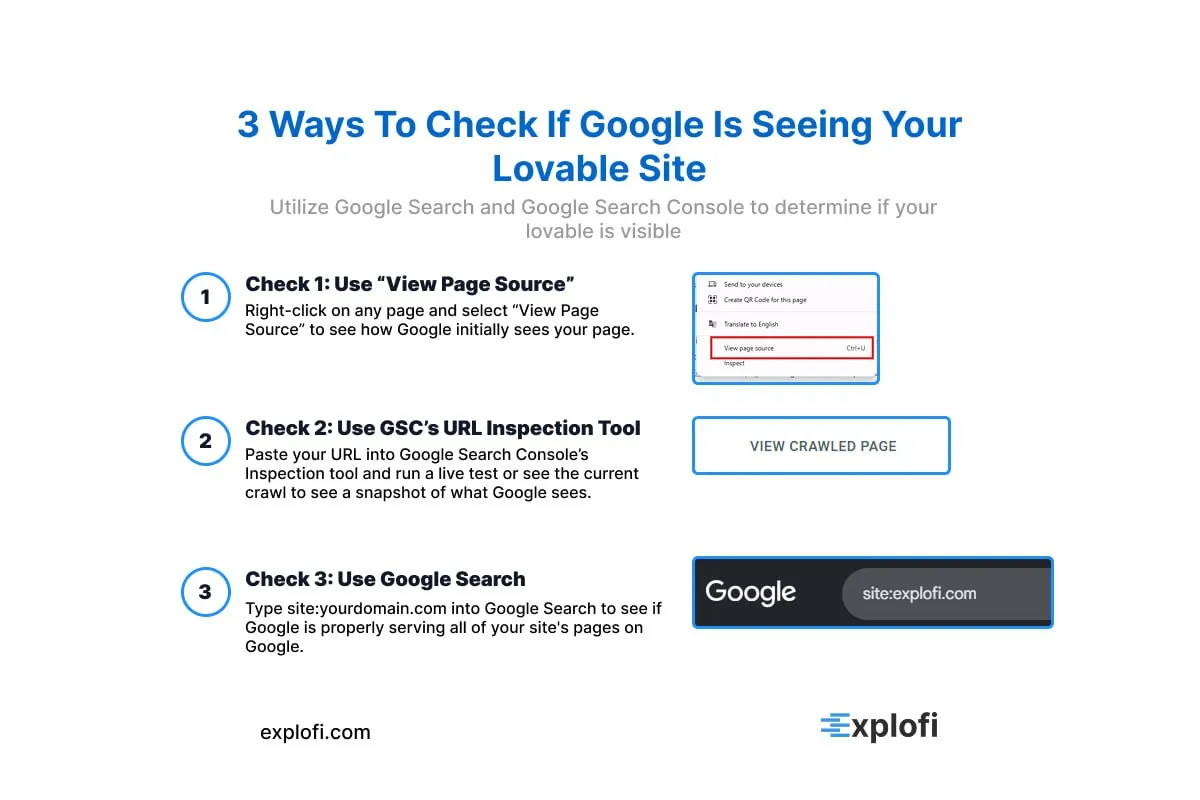
The fastest way to confirm whether Google sees your lovable site is to check Google Search Console using the URL inspection tool, which reveals the exact rendered HTML Google captured during its last crawl. Specifically, look at three signals:
- The "Page is indexed" status
- The last crawl date
- The rendered screenshot showing what Googlebot actually saw
If the rendered screenshot shows a blank page or a loading spinner, Google received your JavaScript shell before your content loaded. Notably, the URL inspection tool also exposes missing meta tags and whether your canonical URL matches the correct URL Google resolved, two factors that directly suppress ranking potential on lovable websites.
Check 1: How to Use "View Page Source" to Spot an Empty Shell
Right-clicking any page and selecting "View Page Source" reveals the raw HTML Google initially receives. If the source shows only a `<div id="root"></div>` with minimal text, your lovable site is serving an empty shell. Unlike browser DevTools, page source skips JavaScript execution entirely, showing exactly what the rendered HTML delivers to Googlebot on that critical first request.
Check 2: How to Use Google Search Console's URL Inspection Tool
Paste your website URL into the URL Inspection Tool inside Google Search Console and run a live test. The tool returns three critical data points:
- Coverage status (indexed or not)
- Last crawl date
- The rendered HTML snapshot Google actually stored
If the rendered site shows incomplete content, Google indexed your JavaScript shell, not your actual page.
Check 3: The 60-Second Test to Confirm Your Site Is Invisible
Type `site:yourdomain.com` into Google Search and count the indexed pages. If your lovable sites return zero results or fewer pages than you've built, Google confirms the invisibility. The rendered HTML Google stored simply lacks indexable content, meaning your pages exist live but remain effectively hidden from every real search query.
Technical Roadblocks That Kill Your Lovable Site's Rankings Before They Start
Lovable sites running on an `app.` subdomain face an immediate structural disadvantage, since Google treats subdomains as separate entities, fragmenting link equity across two properties instead of consolidating it under one. Beyond domain structure, rendered HTML delivered without proper SSR means Googlebot often operates on a strict crawl budget, and Google's own documentation confirms that JavaScript-heavy pages consume that budget faster.
A proper sitemap with last mod dates and verified ownership through a DNS TXT record are non-negotiable starting points.
Every Page on Your Lovable Site Has the Same Title Tag
When every page on your site shares the same title tag, Google treats them as duplicate content, which directly suppresses rankings. Lovable's default output typically generates a single static title like "My App" or "Home" across every route, giving crawlers zero differentiation between pages. According to Google's Search Central documentation, title tags are a confirmed ranking signal, and unique titles help Google understand each page's distinct purpose.
The consequences are specific:
- Google arbitrarily picks one page to index
- Competing pages get filtered from results
- Clickthrough rates drop because no title matches real search queries
To add unique SEO meta tags, you need to prompt Lovable to inject dynamic `<title>` elements per route, not just at the root level.
Why Duplicate Title Tags Destroy Your Search Rankings
Reduced click-through rates and lost organic traffic follow when rankings drop across all pages simultaneously. Since Google's algorithm cannot distinguish between pages sharing identical titles, it arbitrarily selects one to rank, suppressing the rest and effectively canceling out any seo investment made into those pages.
How to Write Unique, Keyword-Rich Title Tags for Each Page
Each title tag should follow the format: primary keyword + secondary modifier + brand name, keeping the total under 60 characters to avoid truncation in search results. For a pricing page, write "Affordable Web Design Plans | YourBrand" rather than repeating a generic homepage title, since specificity helps pages rank consistently across distinct queries.
Tools to Audit and Fix Duplicate Meta Titles Across Your Site
Screaming Frog SEO Spider is one of the most reliable tools for catching duplicate meta titles, crawling up to 500 URLs for free and flagging identical title tags across every page. Paired with Bing Webmaster Tools, which surfaces duplicate title warnings directly inside its Pages report, you get a clear picture of which lovable sites are bleeding rankings.
From there, a practical audit workflow looks like:
- Export all page titles
- Filter for exact duplicates
- Rewrite each flagged title using distinct primary keywords
Your Lovable Site Is Missing a Sitemap.xml
Without a sitemap.xml, Google's crawlers have no structured map of your site's pages, which means many URLs simply never get discovered. For lovable sites especially, this gap is critical because Lovable generates dynamic, JavaScript-heavy builds where page links aren't always visible in plain HTML.
Google's own documentation confirms that sitemaps are particularly valuable for sites with pages that aren't well-linked internally. A missing sitemap can leave dozens of built pages completely unindexed, directly cutting ai search visibility across every query your site should be ranking for. Submitting a sitemap.xml through Google Search Console accelerates crawl coverage and signals which URLs carry indexable, substantive content worth prioritizing.
Why Google Cannot Discover Your Pages Without a Sitemap
Without a sitemap.xml, Googlebot relies entirely on link discovery, meaning any page without an inbound link becomes invisible to crawlers. Google's own documentation confirms that sitemaps are especially critical for large or newly launched sites. For lovable sites built through vibe coding, orphaned pages are common, leaving potentially indexed content completely undiscoverable.
How to Generate a Sitemap.xml for Small and Large Lovable Sites
For lovable sites with under 50 pages, manually building a sitemap.xml using tools like XML-Sitemaps.com works well, generating a structured file listing every URL with priority values between 0.1 and 1.0. Larger sites exceeding 50,000 URLs require splitting into multiple sitemaps, each capped at 50,000 entries per Google's indexed limit.
Either way, the file needs:
- Correct `<loc>` tags for each URL
- Accurate `<lastmod>` timestamps
- A submitted path through Google Search Console under your custom domain
How to Submit Your Sitemap to Google Search Console
After uploading your sitemap.xml, navigate to Google Search Console, then select "Sitemaps" under the Index section. To verify ownership of your property, you'll need to add a DNS TXT record or HTML tag. From there:
- Paste your sitemap URL into the "Add a new sitemap" field
- Hit submit and monitor the coverage report for crawl errors
No Canonical Tags Are Telling Google Which Page to Index
Without canonical tags, Google indexes duplicate or near-duplicate pages simultaneously, splitting your ranking signals across multiple URLs. For a live website built on Lovable, this creates a measurable problem: PageRank dilution weakens every competing version of that page. Canonical tags work by inserting a `rel="canonical"` link element into your page's `rendered HTML`, pointing Google toward the authoritative URL you want indexed.
Without them, three harmful patterns emerge:
- Parameter-based URLs like `/page?ref=social` compete against `/page`
- HTTP and HTTPS versions splitting link equity
- Trailing slash variants like `/about` versus `/about/` treated as separate pages
Google's own documentation confirms canonical tags directly influence which URL appears in search results.
What Canonical Tags Do and Why Lovable Sites Skip Them
Canonical tags signal to Google which URL is the "original" when duplicate or near-duplicate versions exist. Lovable's default setup deploys sites on an `app subdomain` before a `custom domain` is applied, creating two indexable versions of the same page. Without intervention, `Lovable users` rarely configure `rendered HTML` to include canonical declarations, leaving both URLs to compete directly in search.
How to Add Canonical Tags to Every Page on Your Lovable Site
Injecting a `rel="canonical"` tag into every page requires editing the `<head>` block of your site's rendered HTML directly. In Lovable's editor, locate the custom code or head injection setting, then paste `<link rel="canonical" href="https://yourcustomdomain.com/page-url" />` for each page, replacing the URL with your custom domain path.
This ensures Google reads one authoritative source per page rather than resolving the conflict itself.
Your Default Robots.txt File Is Blocking Search Crawlers
Lovable's default `robots.txt` file often ships with `Disallow: /` applied broadly, which instructs every crawler, including Googlebot, to skip the entire site. The rendered HTML Googlebot receives during crawling reflects these directives immediately, meaning no page gets indexed regardless of how well-optimized your content is.
To fix this, replace the blocking rule with:
- `User-agent: *`
- `Disallow:`
This allows all crawlers full access across your custom domain.
How to Write a Robots.txt That Lets Googlebot In
```
User-agent: Googlebot
Allow: /
```
The `Allow: /` directive opens every path on your site to crawling, while `User-agent: Googlebot` targets it specifically. Pair this with a `Sitemap:` line pointing to your `custom domain`'s sitemap.xml so Googlebot locates your pages through the `rendered HTML` structure directly.
Common Robots.txt Mistakes on Lovable Sites and How to Avoid Them
Blocking staging paths while leaving production routes open is a mistake that trips up most Lovable builds. A common error involves applying `Disallow: /api/` too broadly, which cuts off crawlable content nested under API-driven routes. Equally damaging is forgetting to specify `User-agent: *` before any `Disallow` rule, causing unpredictable crawler behavior.
To avoid these issues, your `robots.txt` should always include:
- A specific `User-agent` declaration
- A scoped `Disallow` for private paths only
- A verified `Sitemap:` reference pointing to your custom domain
Your Lovable Site's Meta Tags Are Broken or Missing Entirely
Meta descriptions and open graph tags are two of the most commonly broken elements in Lovable builds, and their absence directly suppresses click-through rates. Google's own documentation confirms that missing meta descriptions force Google to auto-generate snippet text, which typically pulls irrelevant content from the page.
Open Graph tags control how your pages appear when shared across social platforms, and without them, previews render as blank or broken tiles, reducing referral traffic before a single visitor arrives at your site.
How to Create a Reusable SEO Component for Meta Tags
A reusable SEO component centralizes every meta tag into one file, meaning updates propagate across your entire Lovable build instantly. In React-based Lovable projects, a `<SEOHead />` component fed dynamic props for title, description, and open graph values ensures the final render includes complete, consistent metadata sitewide.
Meta Description Best Practices That Improve Click-Through Rates
Meta descriptions should stay between 150 and 160 characters to avoid truncation in search results. Writing them in plain English with a clear value proposition improves click-through rates by up to 5.8%. Effective descriptions include:
- A target keyword near the front
- A specific user benefit
How to Verify Your Meta Tags Are Rendering Correctly
Paste your rendered HTML into Google's Rich Results Test or the URL Inspection tool inside Search Console to confirm what Google actually sees. These tools expose whether your meta tags are present in the rendered output, not just the source code. Check for:
- Missing `<title>` tags
- Truncated or absent `og: description` values
- Duplicate meta descriptions across pages
Broken Heading Hierarchy Is Hurting Your On-Page SEO
Heading tags follow a strict document outline: one `<h1>` per page, followed by `<h2>` subheadings, then `<h3>` nested under those. Skipping from an `<h1>` directly to an `<h3>`, or stacking multiple `<h1>` tags, signals structural disorder to Googlebot. Since Lovable generates component-based layouts, heading levels often get assigned based on visual styling rather than document hierarchy, which breaks the semantic outline entirely.
The rendered HTML becomes disorganized, making it harder for crawlers to parse content depth and topic relevance accurately. Studies show that pages with a logical heading structure rank measurably better because crawlers can correctly weight:
- Primary topics via `<h1>`
- Supporting subtopics via `<h2>`
- Granular details via `<h3>`
Why Google Relies on Heading Structure to Understand Your Content
Google parses heading tags as a content map, using each level to assign semantic weight across a page. When that map breaks, such as an `<h1>` pointing to a design element rather than the page's primary topic, crawlers misread the content's purpose entirely. Heading structure issues affect:
- Topic relevance signals
- Keyword weighting accuracy
- Content depth interpretation
How to Fix H1, H2, and H3 Tags on Your Lovable Site
Auditing your rendered HTML is the fastest path to diagnosing broken heading tags. Export or inspect your Lovable page source, then search for every `<h1>`, `<h2>`, and `<h3>` instance to map the actual hierarchy against your intended structure. Reassign heading levels inside each component file directly, replacing style-driven choices with semantically accurate ones.
For example, a hero subtitle styled large should use `<h2>`, not a second `<h1>`, regardless of its visual weight.
The Relationship Between Semantic HTML and Search Rankings
Semantic HTML gives search engines a meaningful content structure rather than a visual one. Tags like `<article>`, `<section>`, and `<nav>` communicate context directly to crawlers, and Google's documentation confirms these elements influence how rendered HTML is interpreted during indexing.
Fixing the Technical Foundation Is Step One. Content Is Step Two.
Everything you just fixed- the robots.txt, the sitemap, the canonical tags, the meta titles, the heading structure- is the technical foundation Google needs to crawl and index your Lovable site. But fixing those issues alone will not get you ranking. Google needs content to rank you for anything.
A Lovable site with perfect technical SEO and no localized service pages, no blog content targeting real search queries, and no topical depth will still sit invisible in search results. The technical fixes get Google through the door. Content is what makes Google recommend you to customers.
That is where Explofi comes in. Once your Lovable site is technically sound, Explofi helps you build the content layer that makes it rank. You enter your business type, location, and competitors and Explofi generates localized service pages, blog content, and topical maps built around what your customers are actually searching for. The technical foundation gets you indexed. Explofi gets you found.
Your Lovable site looks great. Now make it rank. Explofi helps AI-built sites create the localized content, service pages, and topical maps Google needs to find you. Start free today.
Frequently Asked Questions
Does Lovable support SEO out of the box?
Not fully. Lovable builds React-based sites that render content client-side, which means Google often sees a blank page instead of your actual content on the first crawl. The platform also ships with default settings that can block crawlers, missing meta tags, no sitemap, and duplicate title tags across pages. None of these are unfixable, but they require manual intervention before your site has any real chance of ranking in Google search results.
Why is my Lovable site not showing up on Google?
The most common reason is client-side rendering. Lovable builds with React, which means your content loads after JavaScript executes in the browser. Google's crawler often receives an empty HTML shell on the first visit and queues your site for a second rendering pass that can take days or weeks. Other common causes include a misconfigured robots.txt file blocking all crawlers, no sitemap submitted to Google Search Console, and missing or duplicate meta title tags that prevent Google from distinguishing between your pages.
How do I submit my Lovable site to Google?
Start by connecting your site to Google Search Console using your custom domain. Verify ownership by adding a DNS TXT record or HTML tag. Then generate a sitemap.xml file using a tool like XML-Sitemaps.com and submit it inside Google Search Console under the Sitemaps section. Finally, use the URL Inspection tool to run a live crawl test and confirm Google can see your rendered content correctly.
How do I fix the robots.txt on my Lovable site?
Lovable's default robots.txt often ships with a broad Disallow directive that blocks all crawlers, including Googlebot. To fix it, navigate to your project's root directory, locate the robots.txt file, and replace any Disallow: / directive with Allow: /. Make sure to include a User-agent: * declaration at the top and add a Sitemap: line pointing to your sitemap.xml URL on your custom domain.
Do I need a sitemap for my Lovable site?
Yes. Without a sitemap, Google relies entirely on internal links to discover your pages, which means any page without an inbound link from another page on your site becomes invisible to crawlers. This is especially critical for Lovable sites because React-based builds often have dynamic routing that Google cannot follow without explicit URL guidance. Submit your sitemap through Google Search Console as soon as your site is live.
Will fixing technical SEO on my Lovable site be enough to rank on Google?
The technical fixes are necessary but not sufficient on their own. Fixing your robots.txt, sitemap, meta tags, canonical tags, and heading structure gets Google through the door and ensures your pages are crawlable and indexable. But Google needs content to rank you for anything. Once your technical foundation is solid, the next step is building localized service pages, blog content, and topical maps targeting the specific queries your customers are searching for. That is the content layer that turns a technically sound site into one that actually drives organic traffic.